Scrcpy is one of the most respected Android screen mirroring tools. It is open source, lightweight, fast, and works across Windows, macOS, and Linux. For technical users who like command-line control, it is often a great choice.
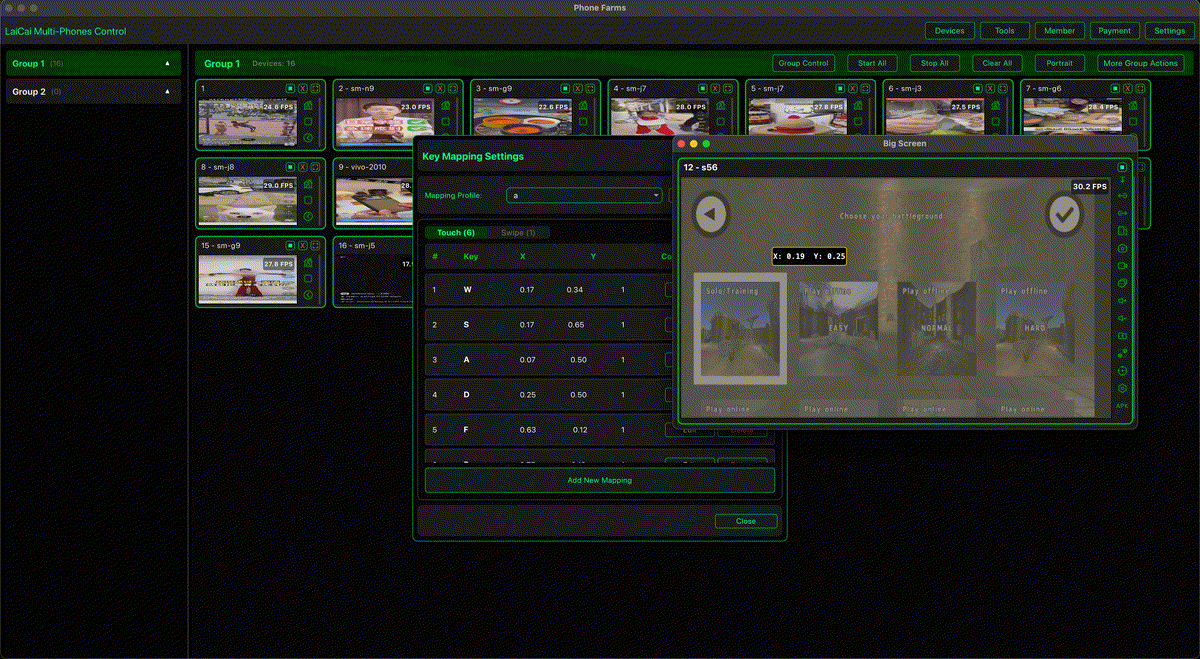
But not every user wants a terminal-first workflow. Gamers, creators, marketers, e-commerce operators, and multi-device users often need a visual control center, drag-and-drop key mapping, device groups, screenshots, screen recording, file transfer, and a simpler daily workspace. That is where LaiCai Screen Mirroring becomes a practical scrcpy alternative.
What Scrcpy Does Well
According to the official Genymobile scrcpy project, scrcpy mirrors and controls Android devices over USB or TCP/IP, does not require root, does not require an app installed on the device, and focuses on lightness, performance, quality, low latency, low startup time, and open-source freedom.
If your goal is simple Android mirroring, quick technical control, recording, or command-line customization, scrcpy is hard to dismiss. It is especially strong for developers, Linux users, and people who enjoy configuring tools directly.
Why Look for a Scrcpy Alternative?
Users usually look for a scrcpy alternative when they want less setup friction or a workflow that is closer to a product interface. Common needs include:
- Game keyboard mapping without building a custom command workflow.
- Mouse aiming and WASD-style controls for mobile games.
- Managing several Android phones in one visible workspace.
- Grouping devices by task, account, game, shop, region, or test scenario.
- Built-in screenshots, screen recording, file transfer, APK install, and quick tools.
- A UI that non-technical teammates can learn faster.
LaiCai vs Scrcpy: Practical Comparison
| Need | Scrcpy | LaiCai |
|---|---|---|
| Lightweight command-line mirroring | Excellent | Product UI instead of terminal-first workflow |
| Keyboard and mouse Android control | Supported | Built into a visual workspace |
| Game key mapping | Possible with technical setup or external workflows | Drag-and-drop mapping, mouse look, WASD, custom profiles |
| Multiple device management | Possible for technical users | Designed around device visibility and groups |
| Business workflows | Flexible but technical | Useful for marketers, e-commerce teams, testers, and operators |
| Team onboarding | Better for technical users | Easier for non-technical teammates |
Why Gamers May Prefer LaiCai
Mobile gamers often want more than mirroring. They want to play PUBG Mobile, Free Fire, Call of Duty Mobile, Arena Breakout, Blood Strike, Mobile Legends: Bang Bang, Honor of Kings, Genshin Impact, Roblox, Minecraft, and other games with a keyboard and mouse workflow. LaiCai's key mapping system lets players place controls visually, customize keys, adjust mouse look, and create game-specific layouts.
For setup details, read the best keyboard mapping setup for Android games on PC and LaiCai drag-and-drop key mapping for mobile games.
Why Multi-Device Users May Prefer LaiCai
If you manage more than one phone, the problem becomes organization. You need to see screens, group devices, move files, take screenshots, record evidence, and avoid mixing up tasks. LaiCai is built for visible multi-device workflows on PC and Mac, which makes it useful for app testing, e-commerce operations, social media work, and game device setups.
For a broader workflow, see how to control multiple Android phones from one computer.
Which One Should You Choose?
Choose scrcpy if you want a free open-source tool, prefer command-line configuration, need a very lightweight mirror, or are comfortable managing advanced options yourself. Choose LaiCai if you want a visual desktop workspace, game key mapping, multi-device groups, built-in operational tools, and an easier workflow for daily use or team members.
Conclusion
Scrcpy is excellent. LaiCai is not trying to replace it for every technical user. LaiCai is the better fit when Android screen mirroring needs to become a complete working environment: gaming controls, key mapping, device groups, screenshots, recording, file transfer, and practical PC/Mac operation.