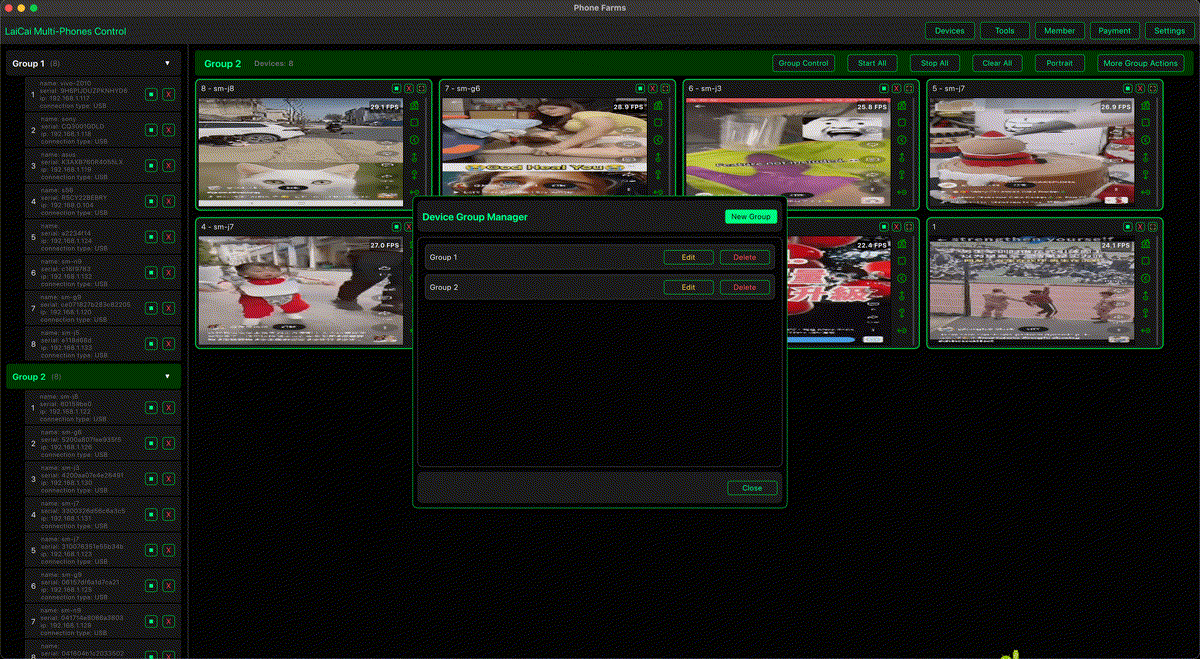
Mobile game QA is not only about whether the game launches. Studios need to check performance, touch layout, device compatibility, input timing, network behavior, language display, battery pressure, graphics settings, and whether the same build feels stable on phones with different chipsets and screen sizes.
Emulators, cloud device labs, and automated tests are useful parts of a modern QA process. Official Android and Firebase testing guidance also points teams toward testing on a wide range of devices and watching technical quality signals such as crashes, slow sessions, and frame-rate behavior. But many game studios still need a local real-device desk for daily hands-on checks. LaiCai Screen Mirroring helps turn multiple Android phones into one visible PC or Mac workspace.
Why Real Android Phones Still Matter for Game QA
Real phones reveal details that are easy to miss elsewhere: thermal throttling, touch response, camera or microphone permissions, notification interruptions, vendor-specific game modes, screen cutouts, refresh-rate behavior, and graphics differences between low-end and high-end devices. For games, small changes in input latency or frame pacing can change how the build feels.
A local device set does not replace cloud testing. It gives producers, QA staff, designers, and engineers a quick way to reproduce issues, compare builds, and record proof when something feels wrong.
A Practical Device Group Setup
- Low-end phones: check loading time, memory pressure, heat, and stable FPS.
- Mid-range phones: represent common player hardware.
- High-refresh phones: check 60/90/120 Hz behavior and graphics settings.
- Different screen sizes: verify HUD, safe area, touch zones, and text scaling.
- Regional/language devices: test localization, font rendering, login flows, and store pages.
With LaiCai, these phones can stay visible in one desktop workspace. Teams can group devices by hardware tier, game mode, region, or test pass. For a broader setup, read how to control multiple Android phones from one computer. For app QA basics, see how to use Android screen mirroring for mobile app testing.
Daily Test Pass Workflow
- Install the same build on the selected Android phones.
- Connect phones by USB where stability matters most.
- Open LaiCai and arrange devices by hardware tier or test scenario.
- Run the same tutorial, match, shop, login, or event flow on each phone.
- Use screenshots for visual bugs and recordings for timing or reproduction issues.
- Record notes with device model, Android version, graphics preset, FPS setting, connection type, and build number.
- Keep bug reports focused on reproducible steps rather than vague “feels laggy” notes.
What to Check During Gameplay
- Frame stability during combat, camera movement, loading, cutscenes, and UI transitions.
- Touch layout for thumbs, tablets, notches, rounded corners, and gesture navigation.
- Input timing for shooting, driving, skill casting, camera rotation, and menu taps.
- Audio sync, voice chat permissions, and notification interruptions.
- Network reconnection, login recovery, update prompts, and resource download flows.
- Screenshot and screen recording evidence for designers, engineers, and support teams.
Use Key Mapping Carefully
For internal QA, keyboard and mouse control can make repeated test paths faster, especially when checking menus, camera movement, or tutorial steps. LaiCai also supports visual key mapping for mobile games. When testing public or competitive game modes, studios should follow their own rules and platform policies. The goal is QA efficiency and reproducible testing, not unfair play.
For control setup ideas, read the LaiCai key mapping guide.
Conclusion
Game studios need a mix of automated tests, cloud labs, emulator checks, player feedback, and real-device validation. LaiCai fits the local real-device part of that workflow: multiple Android phones on one screen, fast switching, screenshots, recordings, file transfer, and clearer bug reproduction. For small and mid-sized teams, that can make daily mobile game QA more visible and less chaotic.