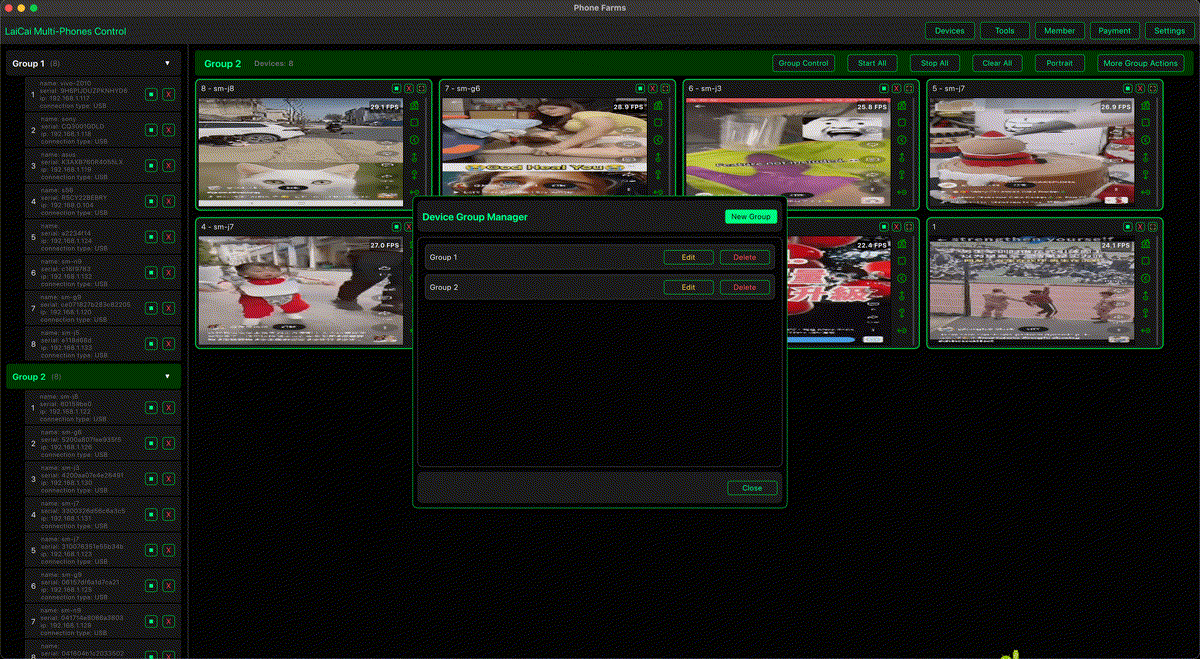
A small operations team does not always need a large enterprise device lab. Many app teams, e-commerce teams, game studios, support teams, and agencies simply need a reliable way to check real Android phones, compare device behavior, capture evidence, and keep work organized.
With used Android phones, a stable computer, USB hubs, clear labels, and LaiCai Screen Mirroring, you can build a practical device lab that is affordable and easy to maintain.
What a Low-Cost Device Lab Is For
A device lab is useful when one phone is not enough. Different Android brands, screen sizes, refresh rates, chipsets, network conditions, and system versions can change how an app, game, store workflow, or customer support process behaves.
- Mobile app testing on real phones.
- Game QA across different performance levels.
- E-commerce app checks, product listings, chat apps, and order flows.
- Customer support troubleshooting with repeatable screenshots and recordings.
- Training staff on mobile workflows without crowding around one phone.
Start with the Right Phones
You do not need flagship devices only. A healthy lab usually mixes cheap second-hand Android phones with a few stronger models. Keep at least one low-end phone, one mid-range phone, one large-screen phone, and one newer Android version if your budget allows it.
Check the battery, screen, touch response, USB port, Wi-Fi stability, and storage before adding a phone to the lab. If a device has a weak battery or unstable cable connection, label it clearly or remove it from daily testing.
Hardware Setup
The basic setup is simple: a Windows or macOS computer, several Android phones, good USB cables, powered USB hubs, phone stands, and a small label system. Powered hubs are important when several phones are connected because weak power can cause random disconnects.
Use short, reliable cables where possible. Long or damaged cables can affect stability. If you use Wi-Fi mirroring for some devices, keep the phones and computer on the same stable network and avoid congested public Wi-Fi.
Organize Devices Before You Test
The biggest mistake is connecting many phones without a naming system. Give every phone a short device code such as A01, A02, B01, or QA-LOW-01. Add model, Android version, screen size, and owner or project notes in a spreadsheet or team document.
Inside LaiCai, group devices by project, testing stage, customer case, or device level. For example: Intake, Daily Test, Low-End, Game QA, Support Case, Ready to Return. This turns a messy phone table into a visible workflow.
Recommended Workflow
- Label each phone physically and in your device list.
- Connect phones with stable USB cables or a trusted Wi-Fi setup.
- Mirror the screens in LaiCai and arrange them by group.
- Set reasonable mirroring quality: use higher resolution for visual checks and lower settings when many phones are active.
- Run the same checklist on each device.
- Take screenshots or short recordings when a problem appears.
- Write the result immediately, including device code, app version, network, and steps to reproduce.
How LaiCai Helps
LaiCai is useful because the lab stays centered on real Android devices instead of replacing them with emulators. You can view multiple phones on one computer, switch between devices, keep groups organized, capture screenshots, record clips, and operate phones with a mouse and keyboard when needed.
If you are still comparing lab options, read phone farm vs cloud phone vs real Android device control. For QA workflows, read how to use Android screen mirroring for mobile app testing.
Keep the Lab Clean and Safe
Use test accounts where possible. Do not store private customer data on shared lab phones. Avoid recording private photos, messages, payment pages, or identity documents unless there is a clear approved reason. At the end of each project, reset app data or factory reset the phone when appropriate.
Conclusion
A low-cost Android device lab is not about buying the most expensive phones. It is about building a repeatable system: real devices, stable connections, clear labels, organized groups, and useful records. With LaiCai, small teams can make Android testing and operations more visible without building a complex enterprise lab.