Google 2026 年 Android 安全和隱私更新把重點放在防詐騙保護、fake call detection、Live Threat Detection 和 Android Advanced Protection 上。這對所有 Android 用戶都有價值,對使用真實手機做客服、電商、QA、培訓和多設備工作的團隊尤其重要。
核心結論很簡單:Android 安全功能保護用戶和設備,但不會替代團隊工作流。客服團隊仍然要知道哪台手機對應哪個案件,哪些畫面可以錄製,哪些資料必須隱藏,以及截圖或錄影之後如何交接。
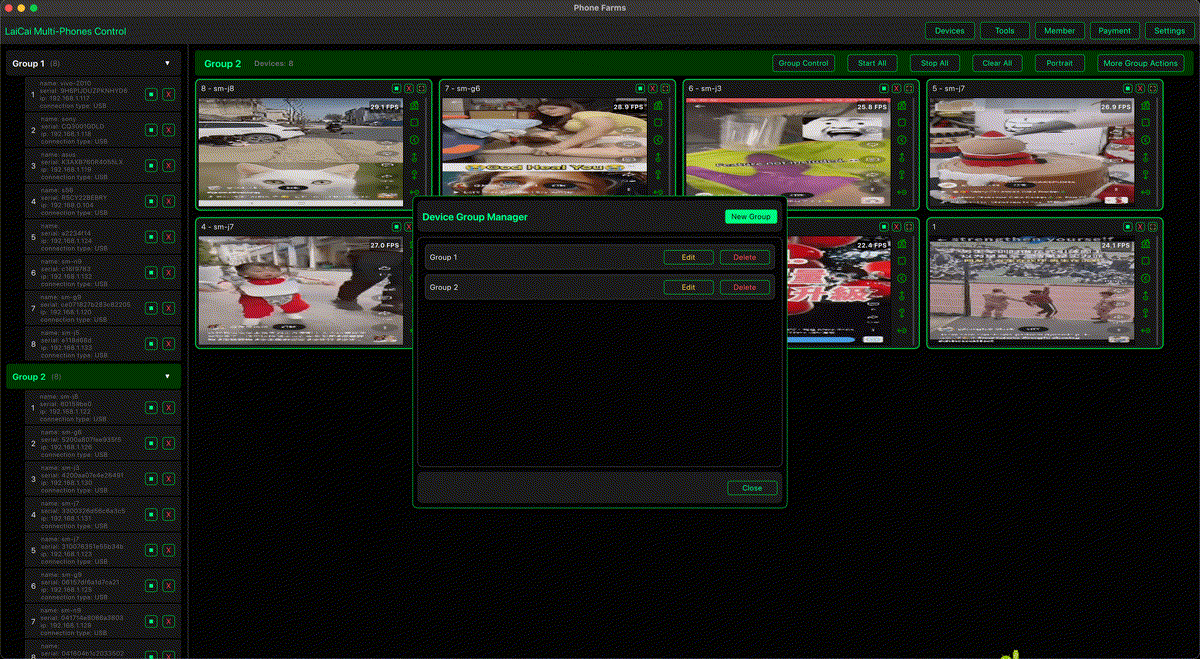
萊彩投屏適合放在這個營運層。它幫助團隊在 PC 或 Mac 上查看並控制真實 Android 手機,整理設備,截取授權截圖,錄製短流程證據。它不會繞過 Android 安全功能,也不能替代同意和內部政策。
簡短結論
萊彩投屏 should be used as a workflow tool around Android security, not as a way to bypass it. A good support desk uses Android 投屏客服工作流, device labels, permission rules, short recordings, and clear handoff notes.
Android 防詐騙保護新增了什麼
Google describes Android protections around scam calls, suspicious app behavior, Chrome app safety, and Advanced Protection. Fake call detection is designed to help users identify impersonation risks. Advanced Protection gives Android users a stronger security posture for higher-risk situations.
These features are valuable, but they are device-level protections. They do not automatically create a support SOP, a QA evidence policy, or a compliant multi-phone operation plan.
它不能替團隊解決什麼
Teams need a repeatable process: assign a device, confirm the app and account, define what can be recorded, capture only the useful evidence, and pass the case to the next person without exposing private data. This is where 電腦控制 Android 手機 becomes useful.
For larger teams, 多設備 Android 控制 helps reduce device confusion. Operators can compare screens, name phones, record brief clips, and keep Android security features visible instead of handling every device blindly.
A practical support desk should treat Android security updates as a trigger to refresh its SOP. When fake-call or scam-related protections become more visible, operators need clearer rules for what to do when a phone warns about suspicious behavior. The right response is not to ignore the warning, disable protection, or record everything. The right response is to pause, mark the device state, capture only the allowed evidence, and escalate the case according to the team policy.
The same principle applies to Advanced Protection. It is designed for stronger security and privacy. If a test phone has Advanced Protection enabled, the team should record that state in the case notes. If a QA task requires testing with stronger protections enabled, that should be part of the test matrix. If a normal support task does not require changing security settings, the operator should leave them alone.
This is where many teams make a process mistake. They buy more phones, add more cables, and open more apps, but they do not define a safe evidence model. Without that model, the phone desk becomes noisy: screenshots are stored in the wrong folder, recordings contain private data, case ownership is unclear, and the next teammate cannot tell whether a warning came from Android, the app, the network, or the user account.
A safer model has three layers. First, Android provides device-level protection. Second, the company defines permission and evidence rules. Third, 萊彩投屏 provides a visible operating desk for allowed real-phone work. Keeping those layers separate makes the workflow easier to audit and easier to explain to new staff.
客服工作台流程
- Label each work phone before the shift starts.
- Keep Android scam protection and security settings enabled unless the QA case requires a documented exception.
- Use 遠端 Android 故障排查 when a teammate needs to reproduce or explain the issue.
- Capture approved screenshots or short recordings only after confirming the support purpose.
- Write a handoff note with device name, app version, Android version, network type, and next action.
電商和 QA 示例
Customer support: A support team can use 客服團隊管理多台 Android 手機 to reproduce an app issue on a real phone, capture a permitted screen, and avoid saving private chat content.
E-commerce: Teams can review product pages, order status, return flows, and chat-adjacent screens through e-commerce Android screen mirroring workflows while keeping payment and personal data out of recordings.
QA: Android security updates can change permission prompts, app-install behavior, sharing, notifications, and suspicious app warnings. QA teams should test those flows on real devices and record only the screen evidence needed for the bug report.
Multi-device operations: If the team runs a legitimate device desk, connect this article with 合規的手機農場軟體工作流 and keep every example focused on support, QA, e-commerce, training, device testing, or repair workflows.
What to Put in the Support Desk SOP
The SOP should name the device categories the team uses: support phones, QA phones, store-operation phones, training phones, and temporary test phones. Each category should have different rules. A training phone can usually use test data. A customer support phone may touch real cases and therefore needs stricter privacy controls. A QA phone may install debug builds, but a store-operation phone should stay close to a normal user environment.
For each category, define what operators can capture. For example, support may capture an error state, order status, app version page, permission prompt, and reproduction steps. It should not capture full chat histories, payment screens, personal identifiers, authentication codes, or unrelated apps. QA may capture more technical details, but it should still avoid real customer data. Training material should use fake accounts or sanitized screens whenever possible.
The SOP should also define retention. A short support clip may only be useful until the ticket is closed. A QA reproduction clip may need to stay with the bug report. A training clip can be reused longer, but only if it contains no private data. These differences matter because screen mirroring makes evidence easy to capture; easy capture should not become careless storage.
How to Handle Scam Warnings During a Workflow
If an Android phone shows a scam warning, suspicious app warning, unsafe action warning, or another security prompt during a support task, the operator should not rush through it. The safe path is to stop, note the app and action, capture a permitted screenshot if policy allows, and escalate to the responsible support, security, or QA owner.
If the warning appears during QA, the tester should record device model, Android version, app version, install source, account type, network type, and exact steps. If the warning appears during customer support, the operator should avoid exposing the customer's private data in the evidence. If the warning appears during e-commerce operations, the team should confirm whether the phone is a work device, whether the app source is trusted, and whether the account has the right permissions.
安全檢查清單
- 除非有明確測試理由,否則保持 Android 安全功能開啟。
- 客服流程優先使用工作手機或測試手機。
- 每次交接前先給設備命名。
- 只錄製授權畫面和短片段。
- 避開私人聊天、驗證碼、支付資訊和個人身份資料。
- 客服證據、QA 證據、培訓片段和行銷素材分開保存。
- 不要把多設備工具用於垃圾訊息、虛假互動、帳號濫用或規避平台規則。
Decision Table
| Situation | Recommended action | What LaiCai helps with |
|---|---|---|
| Customer reports an app error | Reproduce on a work phone and record a short approved clip | Screen visibility, control, screenshot, recording |
| Android shows a scam or suspicious behavior warning | Pause, document allowed evidence, and escalate | Visible evidence without handling the phone repeatedly |
| QA tests a new build after Android security updates | Run a real-device checklist across models and Android versions | Device grouping and repeatable evidence capture |
| E-commerce team checks order or product pages | Capture only allowed screens and avoid private data | Large-screen review and handoff records |
| Training team teaches safe phone handling | Use sanitized test accounts and reusable clips | Repeatable demonstrations from real Android devices |
推薦內鏈
Read next: RCS 加密後的客服錄影邊界, Android Drop 投屏工作流, and 電腦控制 Android 手機.
常見問題
Does 萊彩投屏 bypass Android scam protection?
No. It mirrors and controls the visible phone workflow when the operator is allowed to do so. It does not disable Google scam protection, fake call detection, Advanced Protection, or app security features.
Should a support desk record every customer screen?
No. Record only the approved workflow evidence. Avoid private messages, verification codes, payment details, personal identifiers, and unrelated apps.
Can this help after Android security updates?
Yes. Teams can retest app flows on real Android phones, document permitted screens, and update SOPs when Android security prompts or behavior change.
官方來源
Google Android security and privacy 2026; Google fake call detection on Android; Android Advanced Protection help; June 2026 Android Drop.