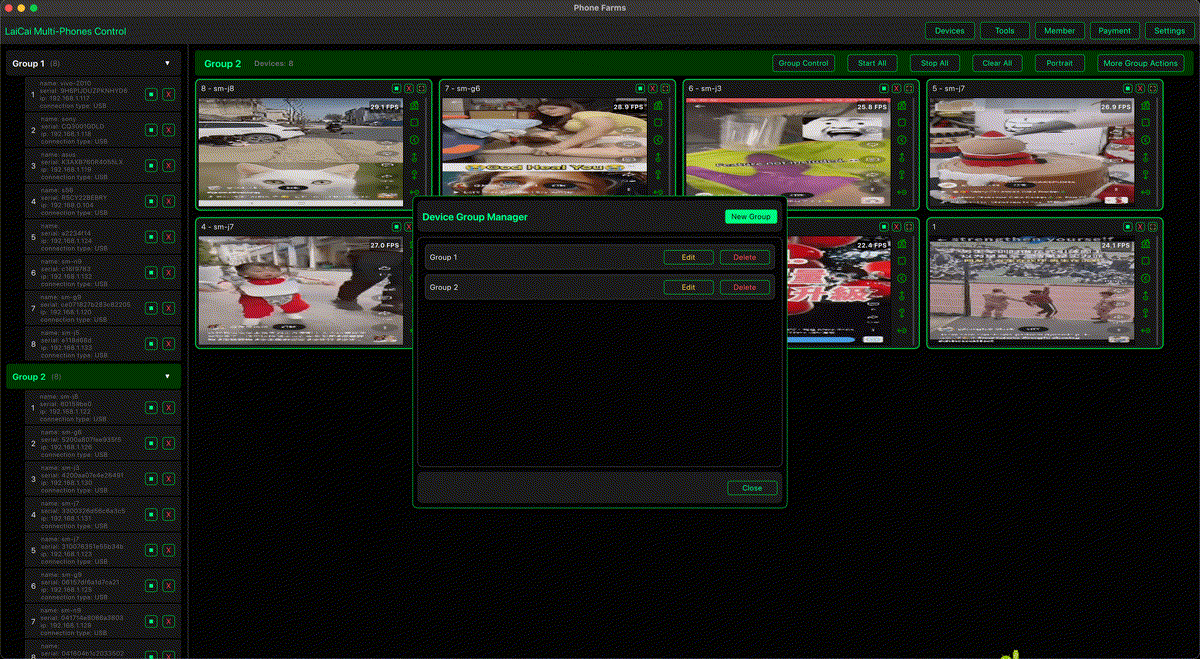
파일 공유는 이미 존재하는 파일을 옮기는 기능입니다. 화면 미러링은 파일이 만들어지기 전 실제 기기 작업을 보고 기록하는 워크플로입니다.
Quick Share와 AirDrop식 공유는 스크린샷, 사진, PDF, 로그 전송에 적합합니다.
지원, 전자상거래, QA, 게임 영상에서는 기기 상태, 조작 단계, 타이밍, 결과를 봐야 합니다. 이때 실제 Android를 PC/Mac에 표시하고 필요한 장면만 녹화합니다.
LaiCai Screen Mirroring works in the screen workflow layer for real Android phones.
Summary
파일 공유는 이미 존재하는 파일을 옮기는 기능입니다. 화면 미러링은 파일이 만들어지기 전 실제 기기 작업을 보고 기록하는 워크플로입니다.
For the broader Android update context, read our earlier guide to June 2026 Android Drop and Android screen mirroring workflows.
Different problems
파일 공유는 이미 존재하는 파일을 옮기는 기능입니다. 화면 미러링은 파일이 만들어지기 전 실제 기기 작업을 보고 기록하는 워크플로입니다.
control an Android phone from a computer is a live workflow. It belongs beside file sharing, not behind it.
File sharing
Quick Share와 AirDrop식 공유는 스크린샷, 사진, PDF, 로그 전송에 적합합니다.
For mixed Android and iPhone teams, Quick Share and AirDrop-style support reduce attachment friction. They are useful when a screenshot, product image, PDF, training asset, or short clip is ready to send.
Screen mirroring
지원, 전자상거래, QA, 게임 영상에서는 기기 상태, 조작 단계, 타이밍, 결과를 봐야 합니다. 이때 실제 Android를 PC/Mac에 표시하고 필요한 장면만 녹화합니다.
That is why teams use multi-device Android control from one computer when the work involves several real devices.
Team use cases
지원, 전자상거래, QA, 게임 영상에서는 기기 상태, 조작 단계, 타이밍, 결과를 봐야 합니다. 이때 실제 Android를 PC/Mac에 표시하고 필요한 장면만 녹화합니다. customer support teams managing multiple Android phones.
지원, 전자상거래, QA, 게임 영상에서는 기기 상태, 조작 단계, 타이밍, 결과를 봐야 합니다. 이때 실제 Android를 PC/Mac에 표시하고 필요한 장면만 녹화합니다. e-commerce after-sales screen mirroring workflows.
지원, 전자상거래, QA, 게임 영상에서는 기기 상태, 조작 단계, 타이밍, 결과를 봐야 합니다. 이때 실제 Android를 PC/Mac에 표시하고 필요한 장면만 녹화합니다. Android screen mirroring for mobile app testing.
지원, 전자상거래, QA, 게임 영상에서는 기기 상태, 조작 단계, 타이밍, 결과를 봐야 합니다. 이때 실제 Android를 PC/Mac에 표시하고 필요한 장면만 녹화합니다. record Android gameplay on PC.
Decision matrix
| Need | Best fit | Why |
|---|---|---|
| File already exists | Quick Share / AirDrop-style sharing | Move the file. |
| Need to see the phone live | LaiCai Screen Mirroring | Mirror and control the real screen. |
| Need proof of steps | LaiCai Screen Mirroring | Record short permitted clips. |
| Need several phones visible | LaiCai Screen Mirroring multi-device workflow | Name and group devices. |
Recommended workflow
기기 이름을 정하고 USB를 우선 사용하며 허용된 화면만 저장합니다. 스팸, 허위 참여, 계정 악용, 규칙 회피에는 사용하지 않습니다.
If your workflow also depends on larger screens or Android 16 connected displays, compare this with Android 16 connected displays for e-commerce and support teams.
Privacy and compliance
- 기기 이름을 정하고 USB를 우선 사용하며 허용된 화면만 저장합니다. 스팸, 허위 참여, 계정 악용, 규칙 회피에는 사용하지 않습니다.
FAQ
Is Quick Share the same as screen mirroring?
파일 공유는 이미 존재하는 파일을 옮기는 기능입니다. 화면 미러링은 파일이 만들어지기 전 실제 기기 작업을 보고 기록하는 워크플로입니다.
Can a team use both?
Quick Share와 AirDrop식 공유는 스크린샷, 사진, PDF, 로그 전송에 적합합니다.
Where does LaiCai Screen Mirroring fit?
LaiCai Screen Mirroring fits when a team needs real Android screen visibility, mouse/keyboard control, screenshots, recordings, and multi-device handoff.
References
Sources: Google June 2026 Android Drop announcement; Google Android updates on Quick Share and AirDrop-style sharing.