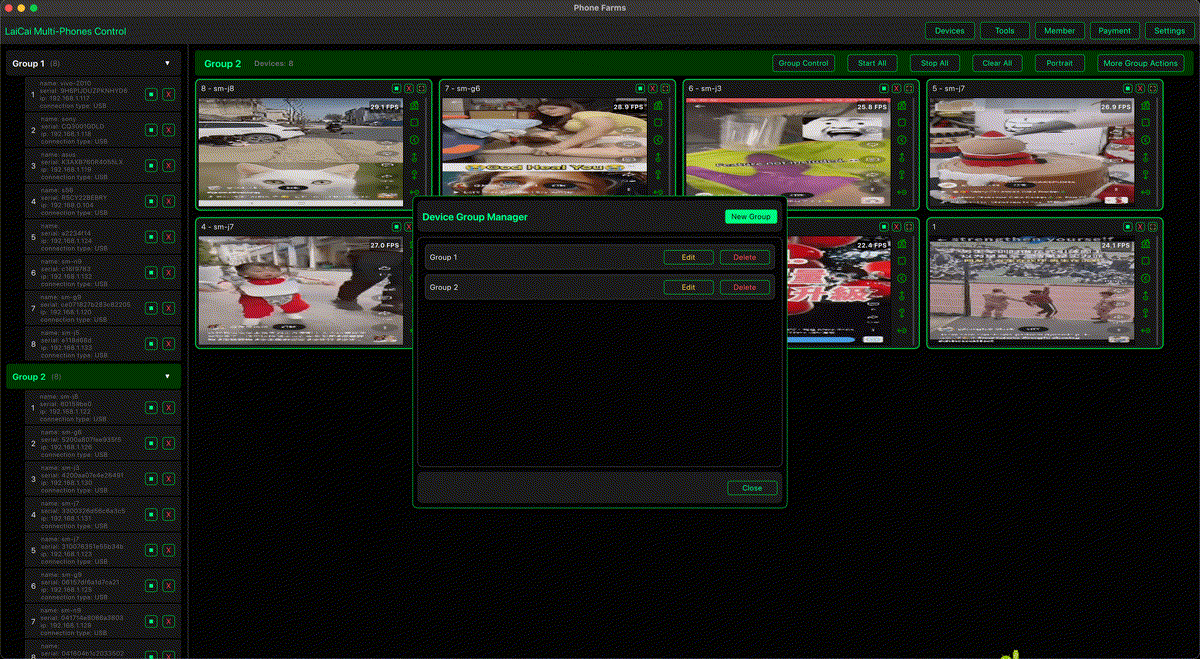
Google’s June 2026 Android Drop made Android file sharing more visible again. Google highlighted Quick Share support with AirDrop on more Android devices, plus a new way to receive files with a QR code. That is useful for mixed Android and iPhone teams because it reduces one common friction point: moving a photo, document, or short clip from one phone to another device.
But file sharing is not the same as screen mirroring. It is also not the same as recording a real phone workflow, controlling a phone from a computer, or managing several Android devices during support, e-commerce, QA, or content production.
This distinction matters for LaiCai Screen Mirroring users. A file-transfer feature can answer “how do I send this file?” A screen-mirroring workflow answers “how do I see this phone, control it, capture what happened, record a short proof clip, and hand the case to another teammate?”
LaiCai Screen Mirroring does not replace Quick Share, AirDrop, or any Android Drop feature. It sits in a different layer: the computer-side workflow for real Android phones. Teams use it when the work depends on what is happening on the phone screen, not only on a file that needs to move between devices.
Short answer
Use Quick Share or AirDrop-style sharing when the job is transferring a file. Use screen mirroring and recording when the job is seeing, controlling, explaining, documenting, or repeating a real Android phone workflow. Many teams need both, but they should not treat them as interchangeable.
For the broader Android update context, read our earlier guide to June 2026 Android Drop and Android screen mirroring workflows.
File sharing and screen mirroring solve different problems
File sharing is object-based: a photo, a PDF, an APK, a screenshot, or a video moves from one device to another. Screen mirroring is session-based: someone watches the phone, interacts with the app, records evidence, and keeps context. Recording is evidence-based: it preserves the steps, timing, and result of a workflow.
control an Android phone from a computer is a live workflow. It belongs beside file sharing, not behind it.
Where Quick Share and AirDrop fit
Quick Share and AirDrop-style sharing are strongest when the file already exists. A support agent can receive a screenshot. A designer can send a reference image. A seller can move product photos. A QA tester can transfer a log file. These are transfer tasks.
For mixed Android and iPhone teams, Quick Share and AirDrop-style support reduce attachment friction. They are useful when a screenshot, product image, PDF, training asset, or short clip is ready to send.
Where screen mirroring fits
Screen mirroring is strongest before the file exists, while the workflow is still happening. A support lead can watch a customer issue on a test phone. An e-commerce operator can compare order screens. A QA tester can reproduce a bug. A creator can record a real mobile game tutorial. In those cases, the team needs visibility, control, and context.
That is why teams use multi-device Android control from one computer when the work involves several real devices.
Use cases by team
Support teams should use file sharing for final attachments and screen mirroring for reproduction. If the issue is “this button disappears after checkout,” a screenshot alone may not explain the path. A mirrored real phone can show the route, timing, app state, and final screen. customer support teams managing multiple Android phones.
E-commerce teams can use file sharing for product images and documents. They still need mirroring when checking shop apps, order status, chat screens, coupon pages, return pages, and after-sales proof. A mirrored desk helps teams avoid mixing up devices and customer cases. e-commerce after-sales screen mirroring workflows.
QA teams should use file sharing for logs and exported clips. They need mirroring for real-time observation: permissions, login, sharing, external display behavior, keyboard input, screen density, app restart state, and device-specific bugs. Android screen mirroring for mobile app testing.
Creators and mobile game communities can use file sharing to move final clips. They need mirroring and recording to make the clip in the first place, especially when the tutorial depends on a real Android phone, game HUD, touch layout, or key mapping setup. record Android gameplay on PC.
Decision matrix
| Need | Best fit | Why |
|---|---|---|
| File already exists | Quick Share / AirDrop-style sharing | Move the file. |
| Need to see the phone live | LaiCai Screen Mirroring | Mirror and control the real screen. |
| Need proof of steps | LaiCai Screen Mirroring | Record short permitted clips. |
| Need several phones visible | LaiCai Screen Mirroring multi-device workflow | Name and group devices. |
Recommended LaiCai workflow
For a team desk, keep Quick Share and screen mirroring side by side. Use Quick Share for attachments. Use LaiCai Screen Mirroring for active phone work. Name devices before the shift starts, choose USB for active control or recording, keep secondary devices at lighter quality, and store only approved screenshots or recordings.
If your workflow also depends on larger screens or Android 16 connected displays, compare this with Android 16 connected displays for e-commerce and support teams.
Privacy and compliance
- Do not record private customer screens without permission.
- Do not use mirroring for fake engagement, spam, account abuse, unauthorized automation, or platform-rule evasion.
- Separate support evidence, QA evidence, training clips, and public marketing content.
- Use work phones and clear device labels whenever possible.
- Keep file-transfer workflows and screen-recording workflows documented separately.
FAQ
Is Quick Share the same as screen mirroring?
No. Quick Share and AirDrop-style sharing move files. Screen mirroring shows and controls the live phone screen.
Can a team use both?
Yes. Use file sharing when the file already exists, and use mirroring when the team needs to see or record the workflow that creates the evidence.
Where does LaiCai Screen Mirroring fit?
LaiCai Screen Mirroring fits when a team needs real Android screen visibility, mouse/keyboard control, screenshots, recordings, and multi-device handoff.
References
Sources: Google June 2026 Android Drop announcement; Google Android updates on Quick Share and AirDrop-style sharing.