Android 16 keeps pushing Android toward larger screens, connected displays, desktop-style windows, and better keyboard and mouse input. For a single supported phone, that direction is useful. A support agent can see one phone on a larger display, and an e-commerce operator can review one app with more space than the handheld screen provides.
The practical question for teams is different: does Android 16 connected display support replace a real support desk, phone farm software, or a multi-device Android workflow? Usually it does not. It helps one compatible device. It does not automatically solve device grouping, side-by-side monitoring, screenshot evidence, short recordings, Mac support, or repeated handoff between teammates.
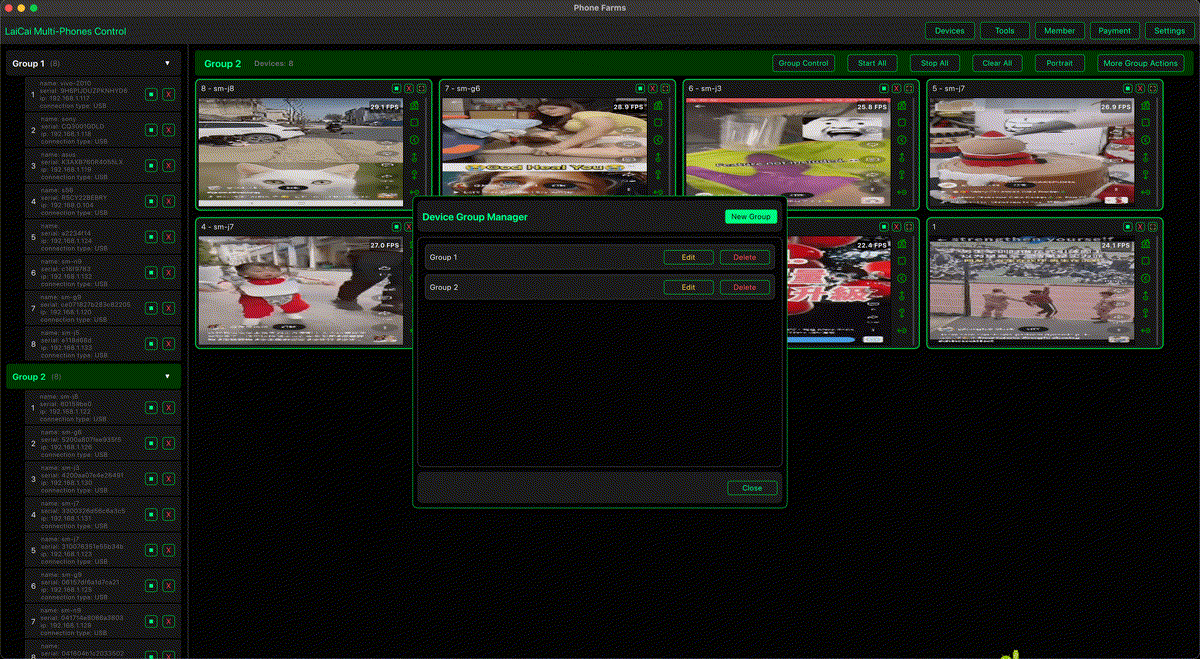
That is where LaiCai Screen Mirroring is positioned. It lets a PC or Mac become the control desk for real Android phones. The phones remain real devices, while the team gets a larger view, mouse and keyboard control, screenshots, recordings, and multi-device organization.
Short Answer
Android 16 connected displays are best understood as a one-device productivity improvement. If the phone, cable, display, and app all support the workflow, one user can work more comfortably on a bigger screen.
For e-commerce and support teams, that is helpful but incomplete. A real desk often has several phones: one for shop chat, one for order checks, one for product-page verification, one for customer reproduction, and one for screenshots or recording. A single external display workflow does not replace that operating model.
What Android 16 Connected Displays Help With
The strongest use case is visual space. A larger display can make it easier to read customer messages, compare product details, inspect app layouts, or type with a keyboard. Android desktop windowing also encourages developers to make apps behave better when resized.
This matters because Android work is no longer only a small-phone-screen problem. Teams should test important apps on external displays, especially if their users connect phones to monitors, tablets, docks, or desktop-style environments.
Where E-commerce and Support Workflows Hit Limits
The limits appear when work becomes operational. Support teams need proof: a screenshot of the setting, a short recording of the issue, the device model, the Android version, the network condition, and the steps already tried. E-commerce teams need repeatability: product checks, customer chat handling, order status, listing review, and handoff notes.
If ten Android phones are part of the day, the team does not want ten separate monitor setups. They need one desk where devices are visible, named, grouped, and controlled. They also need rules: only permitted screens should be recorded, customer privacy should be respected, and team members should avoid fake engagement, account abuse, bulk messaging, or platform-rule evasion.
How LaiCai Screen Mirroring Fits the Desk
LaiCai Screen Mirroring focuses on the computer-control layer. It is not trying to replace Android 16 features. Instead, it gives support, e-commerce, QA, and operations teams a practical way to keep real Android phones in the workflow while operating them from Windows or macOS.
For a support desk, that means faster issue reproduction and clearer handoff. For e-commerce, it means fewer context switches between handheld devices. For QA, it means real-device evidence instead of guessing from one phone. For mobile game or creator teams, it means recording and demonstrating real phone workflows without depending only on emulators.
Workflow Comparison
| Scenario | Better fit |
|---|---|
| One supported phone on one monitor | Android 16 connected display or desktop mode |
| Several real Android phones on one desk | LaiCai Screen Mirroring multi-device workflow |
| Customer support proof | Mirrored phone, screenshot, short recording, device notes |
| E-commerce order and chat workflow | Grouped real phones with team handoff rules |
| Mac-based Android operations | LaiCai Screen Mirroring on macOS |
| Device lab or QA comparison | Real phones with repeated test evidence |
Recommended Setup
- Use Android 16 connected display features when one compatible phone needs a larger screen.
- Use LaiCai Screen Mirroring when the team needs to control real Android phones from a PC or Mac.
- Use multi-device control when several phones must be monitored, compared, recorded, or handed off.
- Keep workflows compliant: support, QA, e-commerce operations, training, and device checks are legitimate uses.
- Do not use any phone desk for fake engagement, unauthorized automation, spam, account abuse, or platform-rule evasion.
Quality and Compliance Checklist
For a deeper operational setup, start with customer support teams managing multiple Android phones, e-commerce after-sales screen mirroring, controlling multiple Android phones from one computer, and the Mac Android group-control guide.
FAQ
Is Android 16 connected display the same as screen mirroring?
No. Connected display is a native phone-to-display workflow. Screen mirroring and computer control focus on operating the phone from a PC or Mac.
Can e-commerce teams use Android 16 connected displays?
Yes, for one supported phone. For multiple shop apps, chats, product checks, and handoff records, a multi-device control desk is usually more practical.
Why does support need screenshots and recordings?
They turn a customer issue into evidence that another teammate can understand without repeating every step.
Does LaiCai replace Android 16 desktop mode?
No. It complements it by focusing on real-phone control, multi-device operation, screenshots, recording, and Mac/Windows desk workflows.
References: Android Developers connected displays; Android Developers desktop windowing.