Build a reviewable Android automation workflow for checking product pages, search results, coupons, translations, screenshots, and app state. LaiCai Screen Mirroring.
E-commerce automation should verify content, not manipulate customers
E-commerce app operations include many repetitive but legitimate checks: confirming that a product page opens, a title is readable, a price label is present, a promotion appears in the expected region, a translated string fits, or a search query returns the approved test product. E-commerce Android automation can make those checks repeatable, but the purpose should be quality assurance and content operations—not fake engagement, mass account activity, automated purchasing, review manipulation, or evasion of marketplace rules.
LaiCai Screen Mirroring provides LaiCai Flow as a visible automation layer for authorized Android devices and emulators. The operator can inspect the graph, watch the device state, review screenshots and runtime details, and stop when the app no longer matches the expected path. This is the useful role of an AI Android automation tool: make a bounded check easier to repeat and audit without hiding business decisions inside an opaque script.
The first run should remain human-observed. Store apps change through experiments, personalized content, consent dialogs, regional availability, network timing, and account state. A workflow that passed yesterday may encounter a new banner today. Treat automation as an evidence-producing assistant and keep a person responsible for deciding whether the observed result is acceptable.
Define a bounded product and search check
Start with a written scope. Name the app environment, approved account, locale, device or emulator profile, starting screen, search query, product identifier, fields to verify, evidence to capture, and exact stopping point. “Check the store” is not a test. “Open the staging app, search for the sample SKU, open its page, confirm the title and displayed price, capture a screenshot, and stop before cart or checkout” is reviewable.
Separate content checks from transactional actions. Most catalog QA does not require adding items to a cart, entering addresses, redeeming a real coupon, placing an order, sending a message, or changing an account. If a later stage is genuinely required in an approved test environment, put it in a separate Flow with its own authorization, test data, cleanup rule, and stop boundary.
Define acceptable variation before running. Prices may include a currency symbol, localized decimal separator, tax label, crossed-out value, or member price. Search ordering may vary by region or experiment. Record which elements must match exactly, which may be present in any order, and which require human review instead of forcing every difference into pass or fail.
Prepare approved devices, accounts, and test data
Use devices and accounts that the organization is authorized to operate. Prefer staging builds, demo stores, test catalogs, and test accounts. Record Android version, screen size, app version, locale, network condition, permission state, and account type so screenshots from different runs remain comparable. Never guess an Android package name; read it from the selected device context before configuring an app-open step.
Reset only the state needed for the check. Clearing all app data, changing location, accepting every permission, or signing in again can create a different scenario from the one customers actually see. Prepare a small matrix such as phone versus emulator, compact versus tall screen, and two priority locales. Expand only after the narrow workflow produces understandable evidence.
Protect commercial and customer information. Screenshots may contain names, addresses, order identifiers, internal prices, notifications, or other apps. Use sample data, crop evidence to the relevant area, restrict access, and define retention. Automation does not create permission to collect or distribute information beyond the test purpose.
Build an observable LaiCai Flow
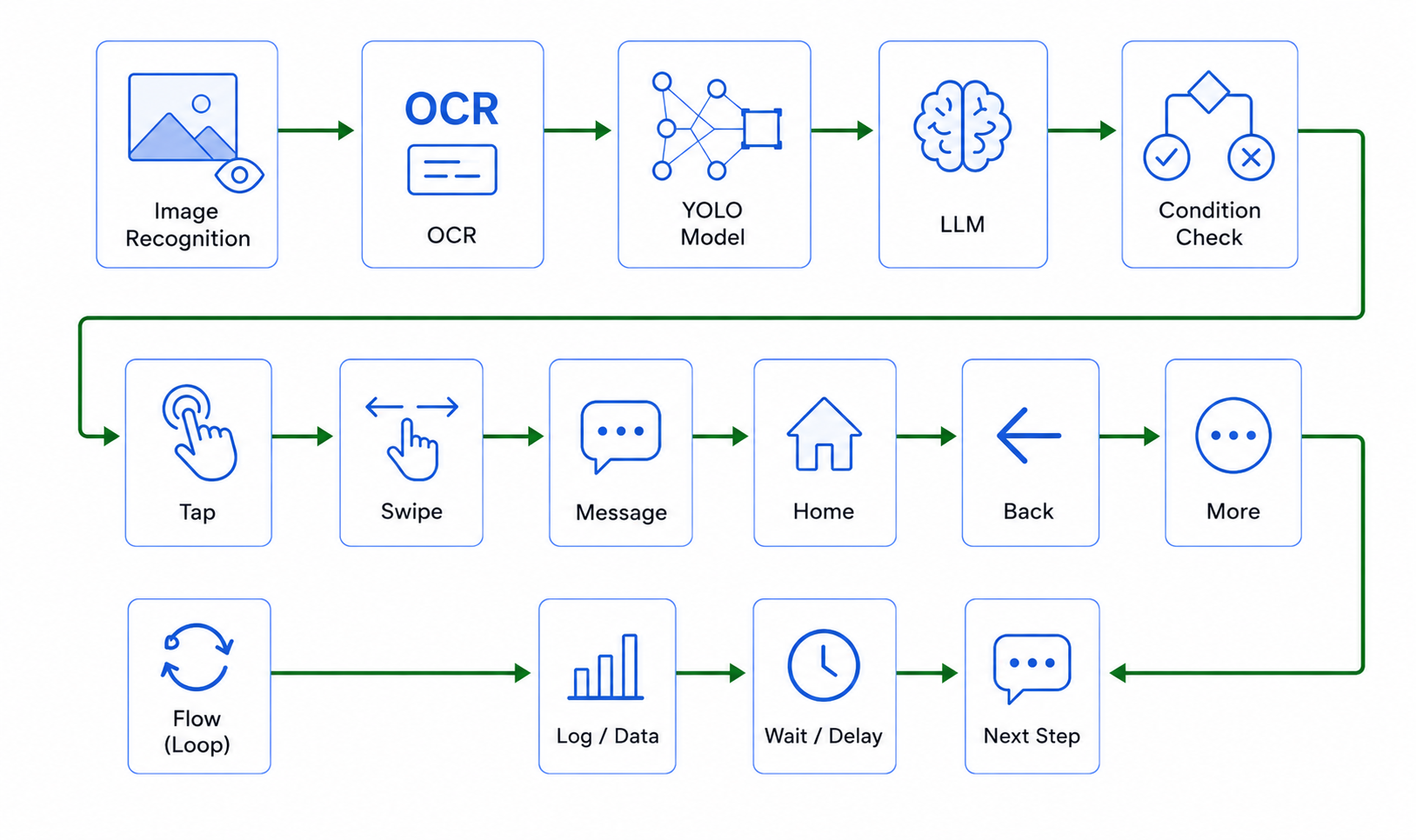
A readable Flow starts with the approved app, waits explicitly for the initial screen, observes the UI, evaluates the result, captures evidence, and ends without unnecessary actions. Current LaiCai node contracts support opening an app by package name, explicit waits, reading Android UI hierarchy, OCR, verified image-template matching, branches, taps, screenshots, and runtime details. Use only the nodes and parameters confirmed by the installed product version.
Keep business phases visible. A main Flow can read like “open catalog,” “search approved SKU,” “verify results,” “open product,” “check fields,” and “capture evidence.” Technical steps such as selecting one OCR result or deriving a tap point can live inside a small child Flow when reuse or complexity justifies it. Avoid one enormous graph that hides the business purpose behind dozens of low-level operations.
Use the LaiCai Flow guide to organize steps and the Android screen mirroring workflow to watch the same device state that the automation is evaluating. Screen mirroring is especially useful during the first run: the reviewer can see whether a keyboard, loading overlay, permission dialog, or personalized module changed the path before accepting the result.
Choose UI structure, OCR, or image matching deliberately
Use Android UI structure when the app exposes stable labels, resource identifiers, or other reliable attributes. A UI lookup reads the current hierarchy once and returns matching items; the Flow should then select and validate the intended item before an action. UI selectors are usually better than remembered coordinates because screen size and layout can change.
Use OCR when the required text is visible but not available through the UI hierarchy. OCR returns result segments, so select the relevant segment and compare the needed value rather than assuming one aggregate text string. Choose the correct language and a justified screen region. A fixed region can miss content when layouts move, so begin broadly or use a region only after verifying it across the target devices and locales.
Use image matching for a stable visual target only when a verified template exists. Match confidence, visual theme, scale, and search region affect the result. Do not invent a template or lower confidence until something matches. If the product card is dynamic, a UI selector or OCR check may provide better evidence than comparing the entire card image.
Check product pages with evidence
For a product page, verify the page identity before checking details. Confirm the approved product title, SKU, or another non-sensitive identifier, then inspect the fields in scope: price display, currency, availability label, promotion badge, image presence, variant selector, shipping message, or translated copy. Capture the starting page and the final evaluated state, not a screenshot after every tap.
Treat price checks carefully. Decide whether the Flow validates exact text, a normalized numeric value, the presence of a currency, or simply that a price region is not empty. Promotions can depend on account eligibility, region, time, inventory, and experiment assignment. If those prerequisites are not controlled, label the result “requires review” instead of reporting a merchandising defect.
Visual quality still needs a human eye. Automation can detect expected text or a known element, but text clipping, overlap, misleading hierarchy, low contrast, distorted images, or an awkward line break may need screenshot comparison and review. Keep the evidence linked to the device, locale, app build, and Flow version that produced it.
Check search results without turning the workflow into scraping
Search checks should use an approved, small query set tied to known catalog items. Verify that the search screen is ready, enter one query, wait for results, confirm the expected product or an approved empty state, capture evidence, and stop. Rate-limit runs and respect the app or marketplace terms. A QA Flow is not a license to harvest a catalog or repeatedly probe production search endpoints.
Do not equate rank changes with defects unless ranking is part of a controlled acceptance test. Personalization, inventory, sponsored modules, region, and experiments can change order. More stable checks include whether search completes, the expected item appears within the agreed review scope, the result card contains the required fields, and an empty-result message is understandable.
When a result is missing, save the query, locale, account type, device, time, network condition, screenshot, and stopping reason. Do not automatically broaden queries, switch accounts, bypass limits, or continue clicking unrelated results. A small evidence package gives the search or catalog team something concrete to investigate.
Compare locales, devices, and app states
Run the same bounded Flow only where the comparison is meaningful. A localization check may compare two or more locales on the same screen size. A layout check may compare compact and tall screens with the same locale. A compatibility check may compare one emulator with selected real devices. Change one major variable at a time so the reason for a difference stays visible.
For multi-device work, use control of multiple Android devices from one computer to organize authorized phones and emulators, and read the e-commerce multi-phone operations guide for broader device-management context. Do not claim that one passing emulator proves every real phone, or that one successful phone covers every marketplace region.
Use consistent evidence names: date, Flow version, device label, locale, test case, and step. A comparison sheet should link each outcome to its screenshot and note whether it passed, failed, needs review, or was blocked. This creates a useful history without turning the workflow into unattended bulk activity.
Stop safely when the screen is unexpected
Set the workflow to fail or stop when a required observation is missing. After opening an app, use an explicit wait before the first screen-dependent check. If the expected search field, result card, product identifier, or page state is absent, capture what appeared and end the run. Continuing with coordinates from a previous layout can open the wrong product or enter data in the wrong place.
Do not add endless retries by default. A short, explicitly approved retry may help with a known loading state, but persistent failure should remain visible. Record whether the problem was timeout, empty UI result, OCR mismatch, template confidence, unexpected dialog, network state, or missing test data. The stopping reason is part of the evidence.
Keep destructive or commercial actions outside the default path. The safest product and search check ends before cart changes, checkout, purchase, review submission, message sending, account creation, or coupon consumption. When an authorized test must include one of those steps, isolate it in a dedicated environment and require human review at the boundary.
A practical review checklist for e-commerce teams
Before running, confirm scope, authorization, test account, package name, app build, device, locale, query, product identifier, expected fields, acceptable variation, evidence points, privacy limits, and stop boundary. During the first run, watch the mirrored screen, keep waits and conditions explicit, and stop at the first unexplained state. After the run, review screenshots and runtime details before sharing a conclusion.
Ask whether another operator can understand the result without rerunning it. Does each screenshot identify the test case? Is the expected value separate from the observed value? Does the record show device, locale, app version, and Flow version? Is private data removed? Is a missing promotion described with its eligibility assumptions? If not, improve the evidence package before scaling to more devices.
The best e-commerce Android automation is intentionally narrow. It reduces repetitive navigation, keeps product and search checks comparable, and gives merchandising, localization, QA, and app teams evidence they can review. It does not replace marketplace policy, customer consent, commercial judgment, or human visual review. With visible device state and safe stopping, LaiCai Flow can turn routine catalog checks into a clearer operational process.