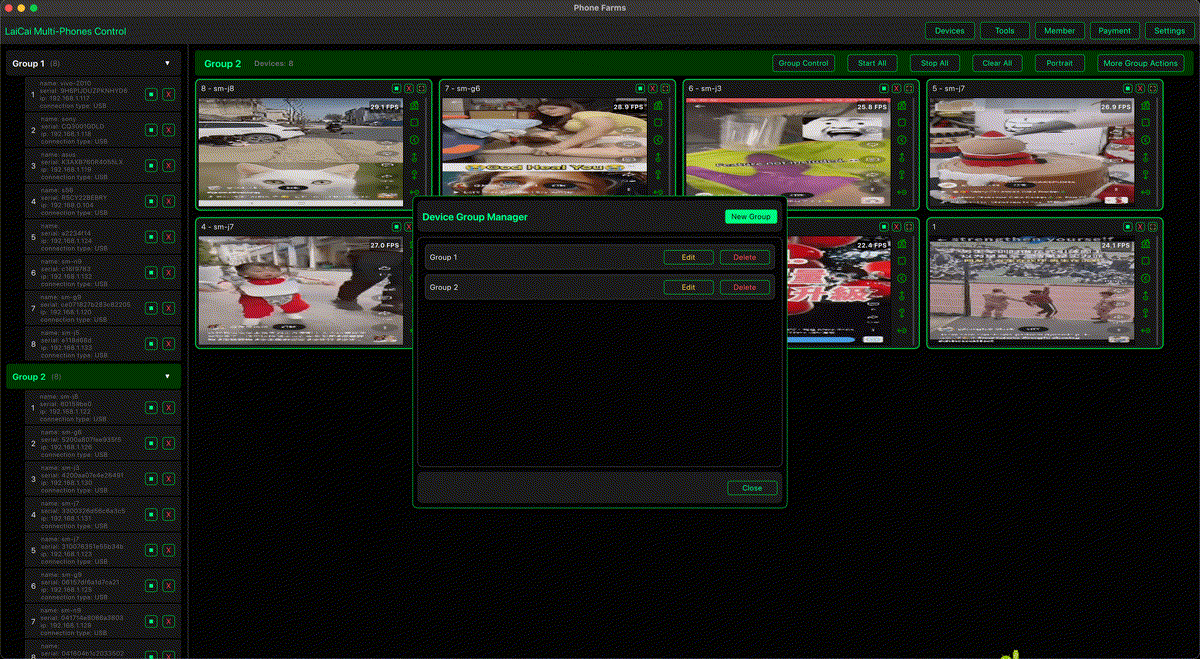
E-commerce sellers often need more than one Android phone. One phone may be used for customer chat, another for store management, another for product checks, another for content posting, and another for testing how a listing or promotion looks on a real mobile device. When every phone is operated by hand, the workflow becomes slow and easy to lose track of.
LaiCai Screen Mirroring lets sellers bring multiple Android phones into one PC or Mac workspace. You can view phone screens, control devices with mouse and keyboard, organize phones into groups, take screenshots, record screens, install APKs, transfer files, and keep phone-based work visible from the desktop.
Why E-commerce Teams Use Multiple Android Phones
Many store and marketplace workflows still happen inside mobile apps. A seller may use different phones for different shops, regions, languages, platforms, customer-service roles, or testing scenarios. Real phones are useful because they show the actual mobile app behavior, notifications, camera access, login state, and device-specific layout.
Common workflows include customer-message checks, order and logistics review, product listing previews, short-video or image publishing, promotion checks, payment or notification review, app testing, and screenshots for internal communication.
The Problem with Manual Phone Management
Operating several phones manually creates friction. You need to pick up each phone, unlock it, switch apps, check messages, move files, take screenshots, and repeat the same steps. When the team grows, phones can be mixed up, messages can be missed, and product checks can become inconsistent.
A desktop control center reduces that friction. Instead of scattering phones across a desk, you can keep the screens visible on one monitor and control them from one keyboard and mouse.
How LaiCai Helps E-commerce Sellers
- Mirror multiple Android phone screens to one computer.
- Control phones with mouse and keyboard.
- Create groups by shop, region, role, or platform.
- Use synchronized control for safe repeated actions.
- Transfer product images, videos, documents, and APK files.
- Take screenshots for product checks or customer-service records.
- Record screens for training, reporting, or issue reproduction.
- Use USB for stable control and Wi-Fi when wireless operation is convenient.
For the full multi-phone workflow, read how to control multiple Android phones from one computer.
Recommended Device Grouping
Do not manage all phones as one flat list. Group them by task so the workspace remains clear:
- Customer service phones: chat apps, after-sales communication, order questions.
- Store operation phones: seller apps, listing tools, promotion checks.
- Content phones: short video apps, product images, campaign publishing.
- Testing phones: different Android versions, screen sizes, languages, or regions.
- Backup phones: devices kept ready for urgent replacement.
Daily Workflow Example
- Connect phones by USB and open LaiCai.
- Group devices by shop or task.
- Open the key store, chat, logistics, and content apps.
- Check unread messages and order notifications.
- Use screenshots or recordings when a product page, buyer issue, or app bug needs documentation.
- Transfer product images or short videos from the computer to the right phone.
- Use synchronized control only for safe repeated navigation, not for spam or platform abuse.
Performance Tips
For several devices, start with 1080p / 30 FPS for important phones and lower FPS or bitrate for monitoring-only devices. Use powered USB hubs, real data cables, and enough Mac/PC memory. Keep only important phone windows large and close heavy apps such as video editors, livestream tools, and too many browser tabs.
If you are new to connecting Android devices, follow the Android connection guide.
Compliance Reminder
Use multi-device control for legitimate store operations, customer support, testing, content preparation, and internal productivity. Do not use any tool for spam, fake engagement, fake orders, review manipulation, account abuse, platform-rule evasion, or any activity that violates marketplace policies.
Conclusion
The best way to manage multiple Android phones for e-commerce is to keep the real devices, but move the control workflow to a desktop. LaiCai gives sellers a practical way to view, group, control, document, and transfer content across Android phones from one PC or Mac.