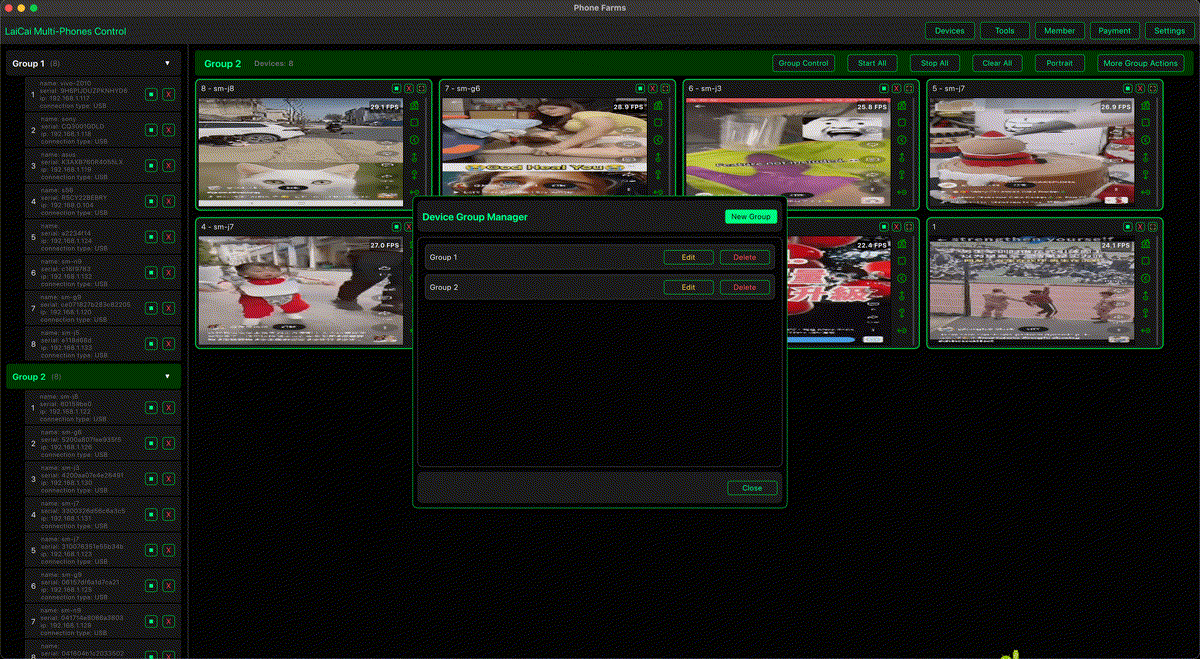
Teams that work on mobile operations often compare three options: a phone farm, a cloud phone service, and local real Android device control. The right choice depends on what you need: remote access, real device behavior, cost control, performance, privacy, or day-to-day operational visibility.
LaiCai Screen Mirroring focuses on local real-device control. You connect your own Android phones to a PC or Mac, mirror the screens, manage device groups, and operate them with mouse and keyboard. That makes it useful for legitimate e-commerce operations, customer support, mobile app testing, content preparation, and multi-device workflows where you want to keep the real phones under your own control.
What Is a Phone Farm?
A phone farm is a collection of physical phones managed together. Some setups use racks, USB hubs, scripts, or specialized software to view many devices, install apps, push files, and perform repeated operations. The main advantage is authenticity: real phones have real hardware, real sensors, real cameras, real notifications, and real mobile app behavior.
The tradeoff is maintenance. A physical device setup needs cables, power, cooling, storage, labeling, OS updates, broken-device replacement, and a clear management process. It can be powerful, but it can also become operationally heavy if the team only needs a clean daily control workspace.
What Is a Cloud Phone?
A cloud phone is a remote Android environment hosted by a provider. Some cloud phone platforms are virtual Android instances; some testing platforms provide real devices in remote data centers. Cloud access is convenient when teams are distributed, when you need many device models for testing, or when you do not want to buy and maintain hardware.
The tradeoff is control. You depend on the provider's device pool, network path, pricing model, security rules, data handling, and latency. For sensitive store work, customer conversations, product assets, or long-running login sessions, some teams prefer to keep devices physically under their own control.
What Is Real Android Device Control?
Real Android device control means you use your own Android phones, but operate them from a desktop interface. With LaiCai, the phones remain real local devices, while the workflow becomes easier to manage on a larger screen. You can group devices by shop, region, client, language, project, or testing scenario.
If you need the actual phone environment but do not want to build a complicated phone farm system, this model is often the practical middle ground.
Comparison Table
| Option | Best for | Strengths | Limitations |
|---|---|---|---|
| Phone farm | Large local device fleets | Real hardware, high ownership, flexible physical setup | Hardware cost, cable management, maintenance, compliance risk if misused |
| Cloud phone | Remote access and broad testing coverage | No local hardware, scalable access, useful for distributed teams | Provider dependency, recurring cost, latency, data and account custody concerns |
| Local real-device control with LaiCai | Daily operations on owned Android phones | Real phones, PC/Mac control, grouping, screen visibility, file transfer, screenshots, recordings | Limited by the phones and computer you own; still needs good cables or Wi-Fi |
When LaiCai Is the Better Fit
- You already own Android phones and want to manage them from one desktop.
- You need real app behavior, real notifications, and real device layout.
- You work with store apps, chat tools, product content, QA checks, or customer support.
- You want a visual device workspace instead of script-only control.
- You need macOS support as well as PC operation.
- You want screenshots, screen recording, file transfer, and device groups in one workflow.
For e-commerce workflows, see how e-commerce sellers manage multiple Android phones. For a broader device workflow, read how to control multiple Android phones from one computer.
Use Cases by Team Type
E-commerce sellers can separate phones by shop, marketplace, language, or customer support role. Marketing teams can prepare creative assets, check mobile pages, and manage approved content workflows. QA teams can compare real-device behavior across Android versions and screen sizes. Support teams can reproduce customer issues on a real phone and document the process with screenshots or recordings.
Compliance Reminder
Multi-device control should be used for legitimate operations: testing, support, content preparation, device management, product checks, and internal productivity. Do not use phone farms, cloud phones, or local device control for spam, fake engagement, fake orders, review manipulation, account abuse, game cheating, or platform-rule evasion.
Conclusion
Choose cloud phones when remote device coverage matters most. Choose a dedicated phone farm when you need a large owned device fleet and have the team to maintain it. Choose LaiCai when you want a practical desktop control center for real Android phones you already own, especially for e-commerce, marketing, testing, and daily mobile operations.