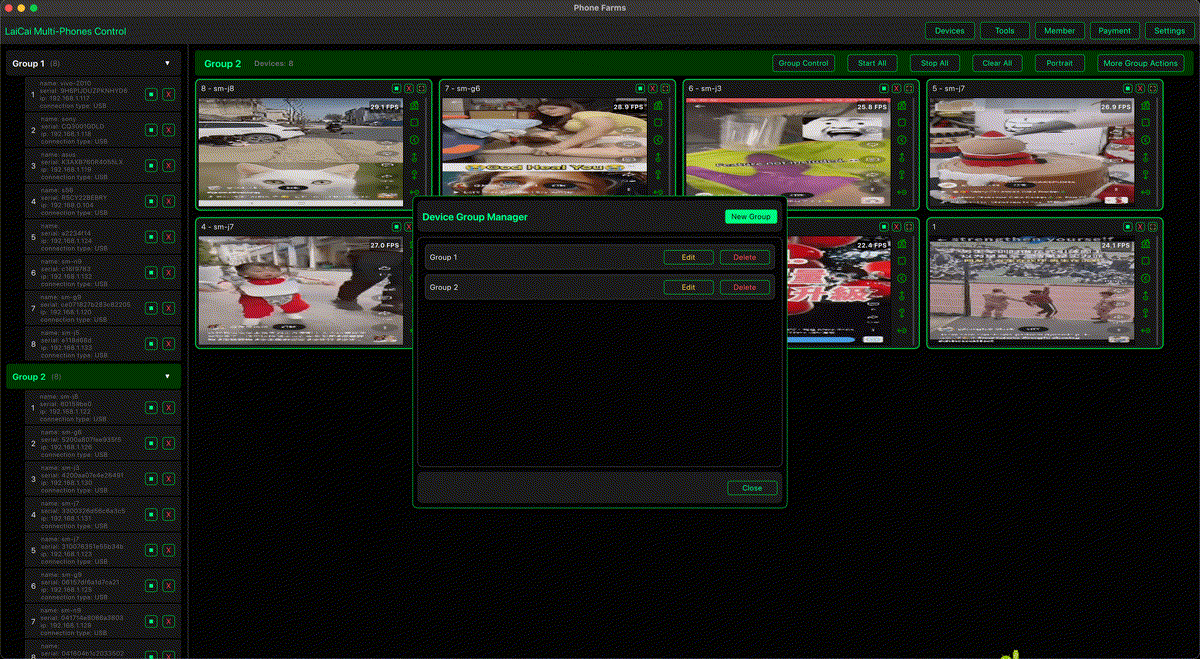
Android 16デスクトップモードは、対応端末1台を外部ディスプレイで使いやすくする機能です。大画面、ウィンドウ、キーボード入力、アプリのリサイズ確認には役立ちます。
しかしphone farmや複数端末制御は別の課題です。チームは複数の実機を同時に見て、名前を付け、グループ化し、スクリーンショットや短い録画で作業証拠を残す必要があります。
LaiCai Screen MirroringはPC/Macから実機Androidをミラーリングして操作する層です。QA、サポート、EC運用、ゲーム制作、実機検証に向いています。
結論
Android 16 desktop mode is useful for one compatible phone on a larger display, but it does not replace phone farm software or mobile phone group control.
The key difference is one-device desktop comfort versus many-device operational control.
Android 16デスクトップモードの役割
For app developers and power users, Android 16 desktop windowing is still important. It changes how apps may behave on external displays and resizable windows.
Teams should test it, but they should not treat it as a complete replacement for real-device desks.
複数端末デスクに必要なもの
A multi-device desk needs device names, groups, screenshots, recordings, and team handoff rules.
This is why QA, support, e-commerce, training, and creator workflows often keep several real phones connected to a computer.
LaiCai Screen Mirroringの位置づけ
LaiCai Screen Mirroring helps keep real Android phones visible and controllable from PC or Mac.
It supports legitimate workflows such as device testing, support evidence, training, e-commerce operations, and mobile game content creation.
おすすめワークフロー
| Scenario | Better fit |
|---|---|
| One supported phone on a large display | Android 16 desktop mode or DeX-style workflow |
| Several real Android phones on one PC or Mac | LaiCai Screen Mirroring multi-device workflow |
| QA evidence across device models | Real-device desk with screenshots and recordings |
| Customer support handoff | Mirrored phone, short recording, clear device notes |
| Mobile game keyboard/mouse mapping | LaiCai key mapping workflow |
| Compliant e-commerce phone operations | Grouped real devices with team rules and records |
FAQ
- Use Android 16 desktop mode when one compatible device needs a bigger desktop-style workspace.
- Use LaiCai Screen Mirroring when the task is computer control of real Android phones.
- Use multi-device control when teams must compare, monitor, document, or hand off several phones.
- Keep phone farm workflows legitimate: QA, support, training, e-commerce operations, device checks, and creator production.
- Avoid fake engagement, account abuse, mass messaging, or platform-rule evasion. Tools should support real operational work, not risky behavior.
Start with multiple Android phones from one computer, the low-cost Android device lab guide, the Mac multi-device control guide, and the LaiCai key mapping guide.
FAQ
Is Android 16 desktop mode the same as screen mirroring?
No. Desktop mode is a native device/display workflow. Screen mirroring and computer control focus on showing and operating the phone from a PC or Mac.
Can Android 16 replace phone farm software?
Not for multi-device operations. A phone farm workflow needs grouping, real-device visibility, screenshots, recordings, and desk-level organization.
Is LaiCai Screen Mirroring only for gamers?
No. Game key mapping is one important use case, but the same real-device control workflow also helps QA, support, e-commerce, training, and device operations.
Should I still test Android 16 desktop mode?
Yes. If your users may connect phones to larger displays, Android 16 desktop windowing should be part of your app testing checklist.
References: Android Developers connected displays; Android Developers desktop windowing.