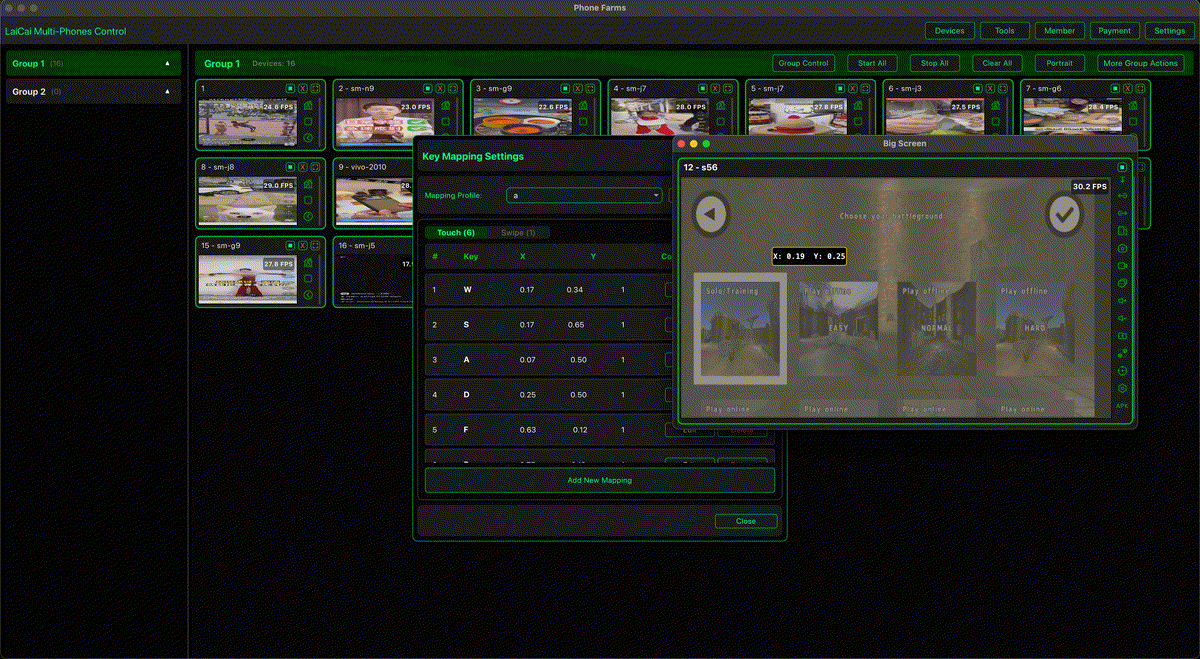
Key mapping ที่ดีทำให้เกม Android บน PC ควบคุมง่ายขึ้นมาก ด้วย LaiCai เกมยังรันบนโทรศัพท์ Android จริง และคุณสามารถแมปคีย์บอร์ดกับเมาส์ของ PC หรือ Mac ไปยังปุ่มสัมผัสในเกมได้ W/A/S/D ใช้เดิน เมาส์ใช้มุมกล้อง คลิกซ้ายใช้ยิงหรือโจมตี คลิกขวาใช้เล็งหรือคำสั่งรอง
LaiCai Screen Mirroring lets you place mapping controls visually on the mirrored phone screen. Start by adjusting the game HUD on the phone, then place mapping points over the stable touch buttons. New users can read the basic key mapping guide.
Universal principles
- Use W/A/S/D for movement.
- Use mouse movement for camera or aim.
- Use left mouse button for fire or attack.
- Use right mouse button for aim, scope, block, or secondary action.
- Keep Space, Shift, Ctrl, Q, E, R, F, Tab, M, and number keys for frequent actions.
- Save separate profiles for different games.
Shooter games
For PUBG Mobile, Free Fire, Call of Duty Mobile, Arena Breakout, Blood Strike, and Standoff 2, prioritize movement, aim, fire, weapon switching, backpack, map, reload, and interact. A good starting layout is W/A/S/D for movement, mouse for camera, left click for fire, right click for scope, Space for jump, C for crouch, Z or X for prone, R for reload, F for interact, Tab for backpack, M for map, and 1/2/3/4 for weapons.
MOBA games
For Mobile Legends, Honor of Kings, Arena of Valor, and similar games, keep skills close to the movement hand. Use Q/E/R/F for skills, D or F for battle spell, B for shop, and G or V for signals. Avoid putting too many important actions on the same finger.
RPG, sandbox, and casual games
For Genshin Impact, Honkai: Star Rail, Wuthering Waves, Roblox, Minecraft, Brawl Stars, and casual games, keep the layout simple. Use W/A/S/D for movement, mouse or arrows for camera, Space for jump, Shift for sprint or dodge, E/F for interact, number keys for items, and M/I/Esc for map, inventory, and menu.
Drag-and-drop mapping
LaiCai's visual mapping makes it easier to align controls with the phone screen. Put each marker directly over the touch button, test it, then save a profile for that game. For more detail, read the drag-and-drop key mapping article and the advanced key mapping guide.
Fair play
Use key mapping for comfort and personal control. Do not use macros, recoil scripts, unfair automation, account abuse, or rule evasion. Always follow each game's rules and tournament requirements.