Android 16 Advanced Protection tăng bảo vệ ở cấp thiết bị trước tấn công online, ứng dụng độc hại, cuộc gọi lừa đảo và rủi ro dữ liệu.
Nhóm hỗ trợ, QA, e-commerce và đào tạo không chỉ bảo vệ một điện thoại cá nhân; họ vận hành điện thoại Android thật trong quy trình làm việc.
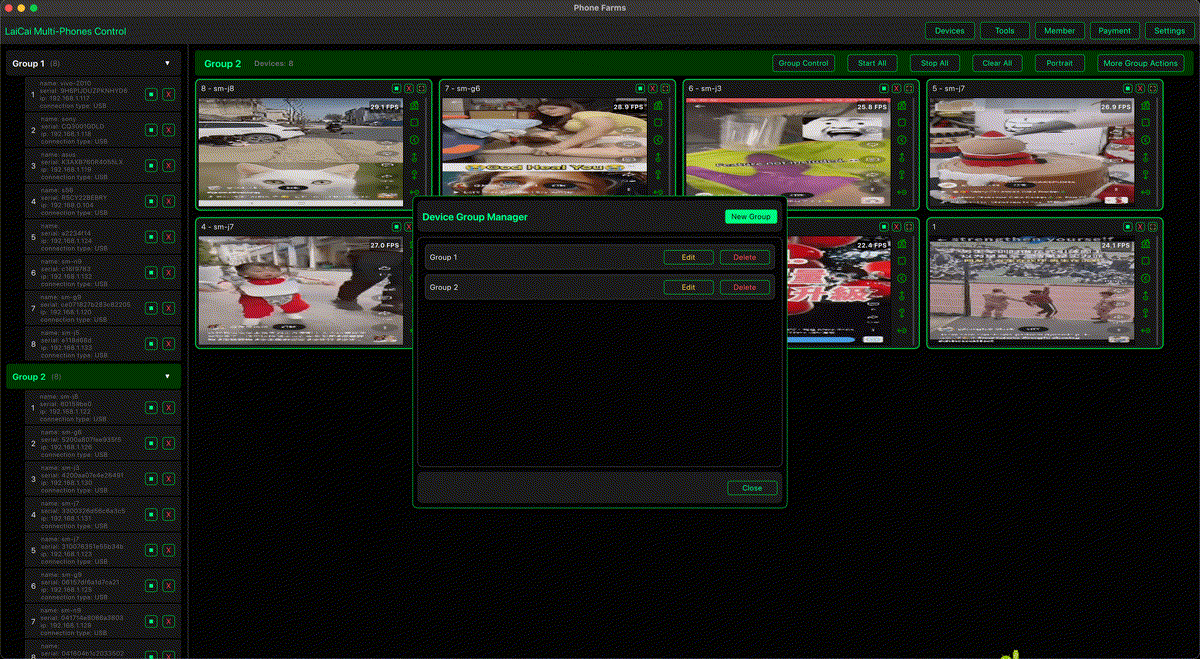
LaiCai Screen Mirroring không thay thế bảo mật Android. Nó là lớp vận hành giúp người được phép xem, điều khiển và ghi lại bằng chứng được duyệt từ PC/Mac.
Tóm tắt
Hãy giữ bảo vệ bật, ghi lại thiết bị nào đang dùng Advanced Protection và xem cảnh báo USB, khóa màn hình, cảnh báo ứng dụng như một phần hồ sơ công việc.
For the practical setup, connect this workflow with điều khiển Android từ máy tính, USB và Wi-Fi cho phản chiếu Android, and thiết lập chất lượng phản chiếu màn hình so operators know whether a connection issue is caused by cable quality, phone lock state, network stability, or Android security behavior.
Advanced Protection thay đổi gì
Hãy giữ bảo vệ bật, ghi lại thiết bị nào đang dùng Advanced Protection và xem cảnh báo USB, khóa màn hình, cảnh báo ứng dụng như một phần hồ sơ công việc.
USB Protection có thể giới hạn kết nối dữ liệu USB khi màn hình khóa, nên phiên mirroring USB đáng tin cậy cần mở khóa điện thoại và xác nhận trạng thái kết nối.
Google’s Android Help documentation also explains that some protections may require a reboot and that the “Apps that checked for Device protection” page is available on Android 16 devices. This matters for teams because a device may not behave the same way before and after a protection state changes.
Khoảng trống trong workflow nhóm
SOP nên tách điện thoại hỗ trợ, QA, vận hành e-commerce và đào tạo; đồng thời định nghĩa màn hình được ghi, thời hạn lưu và cách xử lý dữ liệu riêng tư.
Use phản chiếu Android để test ứng dụng when the goal is bug reproduction, permission-flow testing, or app compatibility validation. Use nhóm hỗ trợ quản lý nhiều Android when the goal is support evidence and customer-case handoff. Use workflow thiết bị Android thật hợp lệ only for legitimate real-device operations such as QA, support, training, repair checks, and e-commerce workflows.
USB Protection và phản chiếu màn hình
USB Protection có thể giới hạn kết nối dữ liệu USB khi màn hình khóa, nên phiên mirroring USB đáng tin cậy cần mở khóa điện thoại và xác nhận trạng thái kết nối.
USB Protection có thể giới hạn kết nối dữ liệu USB khi màn hình khóa, nên phiên mirroring USB đáng tin cậy cần mở khóa điện thoại và xác nhận trạng thái kết nối.
Teams should write this into the SOP: if a trusted USB session stops after the phone locks or reconnects, check Android security state before changing screen mirroring settings. In many cases, the fix is not lowering bitrate or changing FPS; the fix is confirming the phone is unlocked, trusted, and allowed to transfer data.
Những workflow cần quy tắc rõ
SOP nên tách điện thoại hỗ trợ, QA, vận hành e-commerce và đào tạo; đồng thời định nghĩa màn hình được ghi, thời hạn lưu và cách xử lý dữ liệu riêng tư.
- Support: reproduce issues, capture permitted evidence, and avoid private customer content.
- QA: record device model, OS version, app version, protection state, connection type, and exact steps.
- E-commerce: review product pages, order states, and app flows without recording payment or identity data.
- Training: use sanitized demo accounts and reusable recordings that contain no private information.
- Multi-device desks: combine một máy tính điều khiển nhiều Android with device labels and role-based rules.
SOP an toàn cho bàn thiết bị Android
SOP nên tách điện thoại hỗ trợ, QA, vận hành e-commerce và đào tạo; đồng thời định nghĩa màn hình được ghi, thời hạn lưu và cách xử lý dữ liệu riêng tư.
SOP nên tách điện thoại hỗ trợ, QA, vận hành e-commerce và đào tạo; đồng thời định nghĩa màn hình được ghi, thời hạn lưu và cách xử lý dữ liệu riêng tư.
The safest teams also keep a short incident note template: device name, Android version, app version, account type, connection type, Advanced Protection state, warning text, screenshot or recording reference, and owner of the next step. This small habit prevents the common problem where one teammate records a clip but the next teammate cannot understand the device state.
Checklist bảo mật
- Không tắt Advanced Protection nếu không có lý do test được ghi lại.
- Dùng điện thoại công việc hoặc test thay vì điện thoại cá nhân.
- Mở khóa điện thoại trước phiên USB tin cậy và ghi trạng thái kết nối.
- Không ghi mã xác thực, thanh toán, dữ liệu cá nhân hoặc app không liên quan.
- Chỉ ghi clip ngắn, có mục đích rõ.
- Tách bằng chứng hỗ trợ, QA, đào tạo và marketing.
- Không dùng cho spam, tương tác giả, lạm dụng tài khoản, gian lận game hoặc né quy định.
Bảng quyết định
| Situation | Team action | How LaiCai Screen Mirroring helps |
|---|---|---|
| Advanced Protection bật | Giữ bật và ghi trạng thái | Ghi bằng chứng được phép rõ hơn |
| USB lỗi khi khóa | Mở khóa và kiểm tra USB Protection | Giảm nhầm lẫn khi mirroring USB |
| Hỗ trợ cần screenshot | Chụp màn hình được phép | Bàn giao rõ ràng |
| QA test flow nhạy cảm | Ghi model, OS, app, trạng thái bảo vệ | Bằng chứng thiết bị thật lặp lại được |
| Nhiều điện thoại hoạt động | Gắn nhãn và nhóm theo vai trò | Bàn điều khiển nhiều thiết bị rõ ràng |
FAQ
Does LaiCai Screen Mirroring bypass Android 16 Advanced Protection?
No. LaiCai Screen Mirroring is for permitted viewing, control, screenshots, and recording of real Android phone workflows. It should not be used to bypass Android security, disable protections, or avoid app/platform rules.
Should teams disable Advanced Protection for screen mirroring?
Not by default. Keep protections enabled unless a documented QA case requires a temporary change. If a setting must be changed, record who changed it, why, and when it was restored.
What is the most important USB rule?
Unlock the trusted work phone before starting a USB data session, confirm the device prompt, and document the connection state. If the phone is locked, USB Protection may change how the connection behaves.
Where should teams go next?
Read workflow hỗ trợ với bảo vệ scam Android and Android Drop và phản chiếu màn hình to connect Android security trends with support and real-device operation workflows.
Nguồn chính thức
Google Advanced Protection for mobile devices; Android Help: Advanced Protection; Android Help: USB Protection; Android security and privacy in 2026; Chrome on Android Advanced Protection.