Google announced the June 2026 Android Drop on June 2, 2026. The update is not one single feature. It is a package of safety, sharing, visual search, learning, and personalization improvements: fake call detection in Phone by Google, Circle to Search for complete outfits, Google Photos wardrobe, Personal Safety updates for kids, Google Play Books insights, Quick Share working with AirDrop on more Android devices, and new Emoji Kitchen combinations.
For a normal phone owner, these features make Android more helpful. For teams, the question is different: how should support desks, e-commerce operators, QA teams, mobile game creators, and multi-device operations teams adjust their real-phone workflows after an Android Drop? The answer is not “replace everything with a native Android feature.” The practical answer is to combine Android’s device-level improvements with a repeatable computer desk for real Android phones.
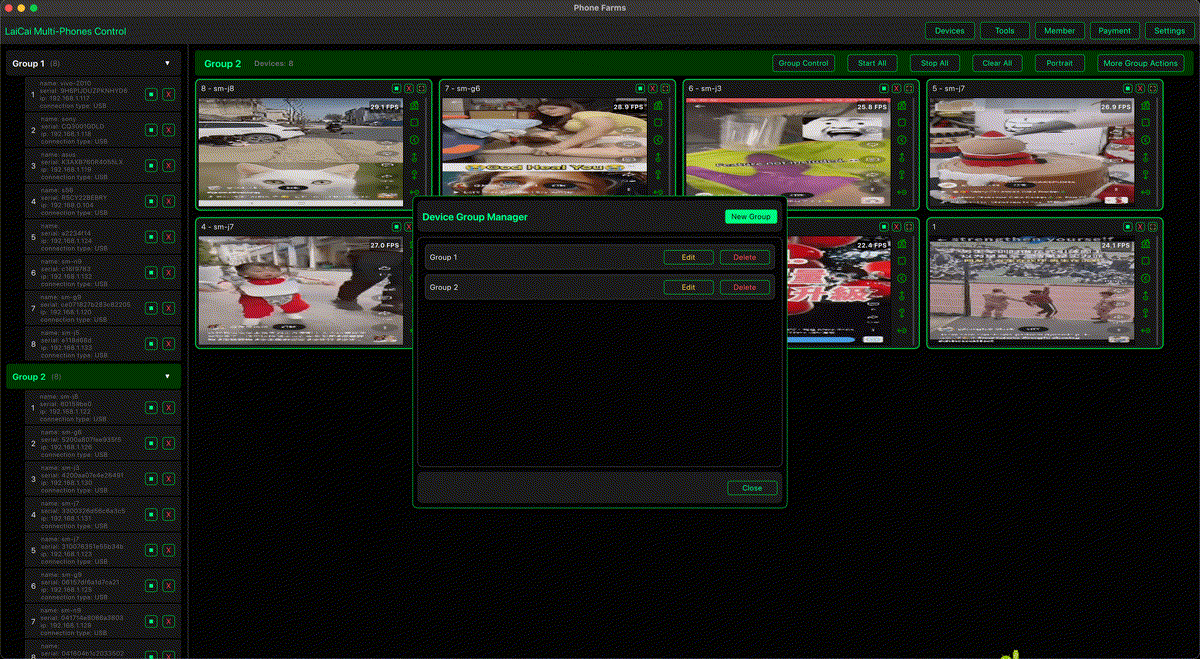
That is where LaiCai Screen Mirroring fits. It does not replace Google’s Android Drop features. It helps teams see, control, screenshot, record, and document real Android phones from Windows or macOS. The value is operational: less hand-holding of devices, clearer evidence, better handoff, and a safer boundary between what a phone can do and what the team is allowed to record or operate.
Short answer
The June 2026 Android Drop improves individual Android experiences, especially safety, sharing, search, and learning. But most team workflows still need a separate operating layer: a PC or Mac that can show real phone screens, organize multiple devices, capture screenshots, record short evidence clips, and keep work traceable. Native Android features help the phone; Android screen mirroring and computer control help the team desk.
June 2026 Android Drop: feature map for teams
Fake call detection matters for trust. Google says Phone by Google can warn when a suspected scammer is impersonating a contact on Android 12+ devices with Phone by Google. For a support team, the lesson is not to record private calls by default. The lesson is to label devices, document permitted screens, and keep security-sensitive steps separate from normal training clips.
Circle to Search for outfits and Google Photos wardrobe show Android becoming more visual. For e-commerce teams, that trend is relevant. Product pages, listing images, chat screenshots, and return evidence are visual work. A mirrored phone desk can help operators compare the live mobile app view with product data, capture permitted screenshots, and share a short note with the next teammate.
Personal Safety updates are a reminder that phones are personal devices. If a team uses shared test phones, support phones, or store phones, there should be clear boundaries: no personal accounts, no customer private data outside approved systems, no unapproved recording, and no use of a phone desk for spam, fake engagement, account abuse, or platform-rule evasion.
Google Play Books insights are less directly related to phone operations, but they matter for training. If Android becomes better at learning and explaining content on-device, teams can still use mirrored screens to demonstrate mobile app workflows, record onboarding examples, and create short SOP lessons.
Quick Share with AirDrop support on more Android devices is useful for moving files between Android and iPhone. It is not the same as screen mirroring. File transfer answers “how do I move this image or document?” Mirroring answers “how do I see the phone, control it, capture evidence, and guide someone through a workflow?” Mixed-device teams need both ideas, but they solve different problems.
What changes when Android work is done by a team
When Android work is done by one person on one phone, a device feature can solve a lot. When Android work is done by a team, the work becomes a process. Someone has to know which phone is assigned to which case. Someone has to capture the screen before a setting changes. Someone has to pass the device state to another teammate. Someone has to verify whether the issue is app-specific, network-specific, account-specific, or device-specific.
That is why a team should not evaluate Android Drop features only as consumer features. They should ask operational questions: which phones need the update, which workflows changed, which apps should be retested, which screens can be recorded, which evidence is safe to store, and which team members need access to the device desk.
Controlling multiple Android phones from one computer is useful because the team can build a shared desk. Devices can be named by case, store, app, test route, region, or model. A support specialist can see the same screen a customer reported. A QA lead can compare one app flow across several models. An e-commerce operator can keep order checks and product checks visible without constantly picking up separate phones.
How mirrored-phone workflows use the new Android context
Customer support: Android safety features reduce risk, but support still needs a practical evidence workflow. Use mirrored phones to reproduce permitted screens, capture short clips, and add notes such as device model, Android version, app version, network type, and steps tried. Start with support teams managing multiple Android phones if your team handles many customer cases.
E-commerce: Android visual features make product discovery and image workflows more important. Operators can use a mirrored-phone desk to check shop apps, order pages, product detail pages, chat screens, return flows, and payment-status screens. For after-sales work, connect the process to e-commerce customer service screen mirroring.
Remote troubleshooting: Android Drop features may change what a customer sees. A remote support team should be able to reproduce the flow on a real phone, capture a screenshot, and explain the next step. That is why remote Android troubleshooting workflows still matter after native Android improvements.
QA and app testing: Android updates change user expectations. Teams should retest login flows, permissions, sharing, screen capture behavior, external display behavior, keyboard input, image selection, and privacy prompts. A real-device desk supports mobile app testing with Android screen mirroring because it keeps evidence visible and repeatable.
Creators and mobile gamers: Android updates can change recording, display, keyboard, and sharing behavior. Creators who record tutorials should keep a real-phone workflow, especially for games and apps where emulator behavior is not representative. For gaming workflows, start with playing Android games on PC without an emulator.
Decision matrix
| Need | Best fit | Reason |
|---|---|---|
| Move a photo or document between phones | Quick Share / AirDrop-style transfer | It is a file-transfer problem. |
| Show one phone on a larger workspace | Android connected display or desktop mode | It improves a single-device experience. |
| Guide a customer through a phone workflow | LaiCai Screen Mirroring | The team can see, control, and capture permitted evidence. |
| Operate multiple Android phones | LaiCai Screen Mirroring multi-device desk | Device labels, groups, and side-by-side views matter. |
| Retest an app after Android updates | Real devices plus mirrored evidence | QA needs screenshots, recordings, and repeatable notes. |
| Create training lessons | Mirrored phone recording | New staff can watch the exact mobile workflow. |
Recommended LaiCai Screen Mirroring setup
For one phone, connect the Android device by USB when possible, open LaiCai Screen Mirroring, confirm the phone screen appears, and record only the screens that are allowed for the task. For multiple phones, label each device before the shift starts. Use names such as Support-01, QA-Pixel, Store-Chat-02, or Return-Test-03. Keep device roles simple, because a clean naming system prevents mistakes during handoff.
For support and e-commerce, build a small checklist: device name, task owner, app name, account type, screenshot permission, recording permission, issue summary, and final status. For QA, add Android version, app build, network type, display setting, and reproduction steps. For training, add a script, expected outcome, and whether the clip can be reused publicly or only internally.
If your team also tests Android 16 desktop behavior, connect this article with the earlier comparison of Android 16 desktop mode, Samsung DeX, and LaiCai Screen Mirroring and the practical limits of Android 16 connected displays for e-commerce and support teams.
Privacy, security, and compliance rules
- Record only screens that the team is allowed to record.
- Do not store private customer data in training clips.
- Use shared work phones, not personal phones, for team operations when possible.
- Do not use screen mirroring for fake engagement, spam, account abuse, unauthorized automation, or platform-rule evasion.
- Keep Android security features enabled unless there is a documented testing reason.
- Separate QA evidence, support evidence, marketing content, and training content.
FAQ
Does the June 2026 Android Drop replace screen mirroring?
No. Android Drop features improve the phone experience. Screen mirroring helps teams operate, record, and document real phone workflows from a computer.
Is Quick Share with AirDrop support the same as LaiCai Screen Mirroring?
No. Quick Share is for file transfer. LaiCai Screen Mirroring is for seeing and controlling the phone screen, capturing evidence, recording workflows, and managing multiple real devices.
Should support teams record every screen?
No. Teams should record only permitted screens and avoid private customer information unless the workflow and consent rules allow it.
What should QA teams test after an Android Drop?
Retest permissions, sharing, screenshots, recordings, keyboard input, external display behavior, app resizing, account flows, and any screens affected by new Android features.