A practical support workflow for turning a device-specific Android complaint into a reproducible case, evidence packet, and useful engineering handoff.
Why support teams keep more than one Android phone
A customer can describe a failure accurately and still leave support unable to reproduce it. The app version may be right, yet the problem only appears on one manufacturer build, Android version, display size, permission state, language, network, or battery policy. A single reference phone cannot represent that range. This is why mobile support teams often keep a small set of real Android phones even when engineering already uses emulators and automated tests.
The goal is not to own every model. It is to maintain enough coverage to answer three questions quickly: can the team reproduce the report, which condition triggers it, and what evidence will let engineering continue without repeating the entire support conversation? AWS Device Farm likewise identifies customer support representatives alongside developers and QA teams, and describes real-device interaction as a way to debug and reproduce customer issues.
- Authentication, payment, notification, permission, camera, Bluetooth, and background-process failures.
- Layouts that break on a particular screen density, font scale, language, or navigation mode.
- Upgrade or installation problems tied to an Android release or manufacturer firmware.
- Problems that appear only after a network change, app backgrounding, battery restriction, or interruption.
- Customer reports that need a screenshot, short recording, device details, and exact reproduction steps before escalation.
Collect the minimum case data before choosing a phone
Do not begin by clicking through random phones. First convert the support conversation into a testable case. Missing intake data wastes more time than the physical device setup because the team cannot distinguish a device-specific defect from an account, build, network, or stale-data problem.
| Case field | Why it matters | Acceptable evidence |
|---|---|---|
| App version and build | Confirms the tested software | About screen, store version, or build identifier |
| Phone model and Android version | Selects the nearest real device | Settings screenshot or diagnostic text |
| Exact starting state | Prevents hidden setup differences | Signed-in state, permissions, feature flags, and prior screen |
| Steps and expected result | Makes the report replayable | Numbered steps plus what should have happened |
| Actual result and timing | Separates visual, crash, network, and delay failures | Screenshot, short recording, timestamp, or error text |
| Network, language, and region | Exposes environmental conditions | Wi-Fi/mobile state, locale, timezone, and market |
| Frequency | Guides repeat count | Always, intermittent, first launch, or after long idle |
If a customer cannot provide everything, record what is unknown instead of silently filling gaps. Support can still test the known path, but engineering should be able to see which assumptions were made. Never ask customers to send passwords, payment details, identity documents, private messages, or unrelated personal files.
Build a small device matrix from customer evidence
A useful support desk is based on the devices your customers actually use, not a shelf of attractive flagship phones. Start with analytics, crash reports, ticket volume, and revenue-critical segments. Select a low-end device, a common mid-range model, a recent flagship, and any manufacturer or Android version that repeatedly appears in unresolved cases.
- Export the top device models and Android versions from reliable product data.
- Group similar devices by manufacturer firmware, performance tier, screen characteristics, and OS generation.
- Choose the smallest physical set that covers the largest share of important cases.
- Add a model only when tickets or product risk justify its maintenance cost.
- Review the matrix quarterly and retire devices that no longer represent meaningful traffic or risk.
A three-to-six-phone desk is often more useful than a large unmaintained collection. Broader compatibility runs can still go to a cloud service. The local desk exists for fast interactive reproduction, support demonstrations, and cases where the same devices are used repeatedly. For the physical setup, see the low-cost Android device lab guide.
Organize the multi-phone support desk
Each phone needs a stable identity. Give it a short code, label it physically, and record its model, Android version, last reset date, battery condition, connection method, installed test build, and assigned test accounts. Use reliable cables and powered USB hubs when several phones share one computer; unstable power and damaged cables can create failures that look like app defects.
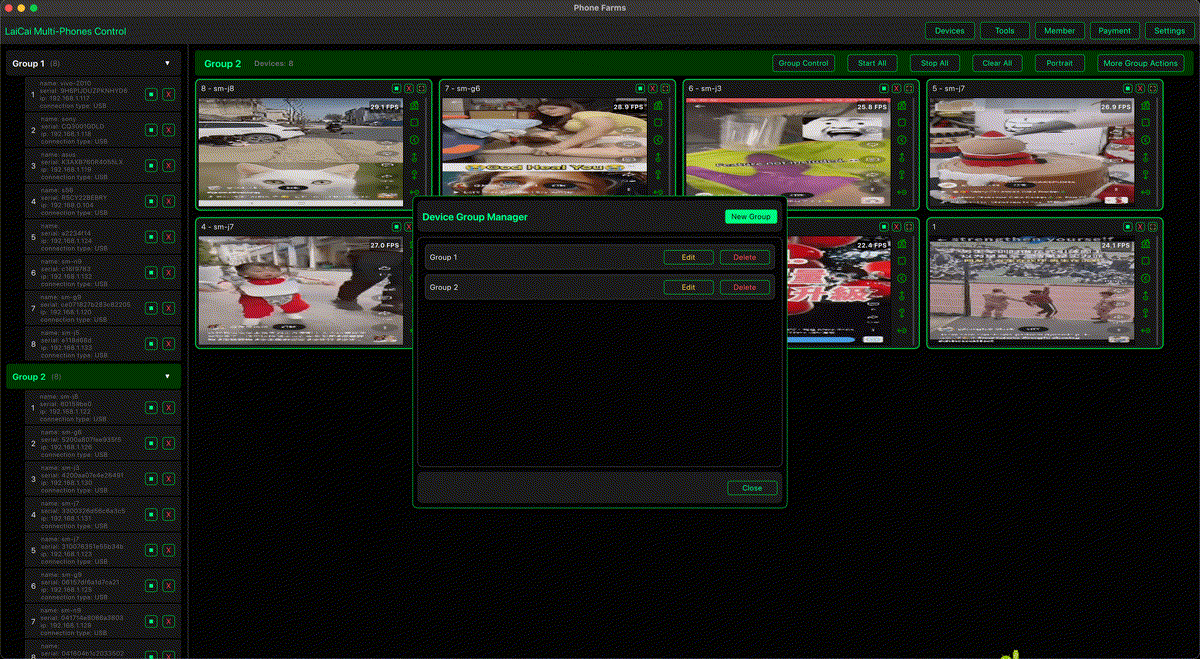
Control multiple Android phones from a common workspace when the team needs to compare screens, move between devices, or repeat an authorized setup step. In LaiCai Screen Mirroring, devices can be visible from one Windows or macOS workstation so the operator spends less time picking up phones and more time comparing the case state. Grouping is useful for separating clean baselines, active support cases, low-end devices, and phones waiting to be reset.
- Keep one known-good baseline device for comparison.
- Use dedicated test accounts with synthetic data whenever possible.
- Reset app data between cases when prior state could change the result.
- Keep the phone code visible in every screenshot or case note.
- Record charging, USB, Wi-Fi, and thermal conditions when they affect the test.
Run a controlled reproduction pass
The fastest path to a useful result is usually a controlled comparison, not a large batch of simultaneous actions. Start on the closest matching device and reproduce the customer's starting state. Run the reported steps once without changing anything. If the issue appears, repeat it to confirm frequency. If it does not, change one variable at a time: network, permission, language, app data, Android version, manufacturer, font scale, or battery policy.
- Create the case card with phone code, app build, account type, network, locale, and starting screen.
- Reproduce the customer's exact steps on the nearest matching phone.
- Repeat the same path on the known-good baseline phone.
- Change only one suspected condition and run the path again.
- Stop when the trigger is isolated or the agreed attempt limit is reached.
- Write down both successful and unsuccessful attempts; negative evidence narrows the next investigation.
Do not use synchronized input when devices have already diverged. A permission dialog, slow load, keyboard, or update prompt can send the same click to different controls. Shared actions are useful only while every selected phone is visibly in the same safe state. Otherwise, operate the devices individually and preserve the difference you are trying to understand.
Create an evidence packet engineering can replay
A useful handoff is small enough to review quickly and complete enough to replay. One ticket should connect the environment, steps, observed result, expected result, and supporting evidence. Screenshots prove a static state; a short screen recording proves timing and sequence; logs explain what the interface cannot show. None of those replaces the others.
| Artifact | Include | Avoid |
|---|---|---|
| Case summary | One sentence describing the failure and business impact | A pasted chat transcript without a conclusion |
| Environment | Phone code, model, Android version, app build, locale, and network | Unverified guesses about the customer's phone |
| Steps | Numbered actions from a defined starting state | Steps such as 'use the app normally' |
| Visual proof | One focused screenshot or short recording | Long recordings containing unrelated screens |
| Logs | Relevant time range and identifiers | Full logs containing secrets or unrelated customer data |
| Comparison | Result on the affected phone and baseline phone | Claiming device specificity after testing only one phone |
| Reproduction rate | Attempts and observed failures | An unsupported statement such as 'happens randomly' |
Name files with the ticket ID, phone code, build, and timestamp. The handoff should let an engineer understand the failure in a few minutes without opening multiple chat threads. For a broader QA workflow, see Android screen mirroring for mobile app testing.
Choose local phones, emulators, or a cloud device service
These tools solve different coverage problems. A local phone desk is not a replacement for a cloud device farm, and a cloud lab does not eliminate the value of familiar phones beside the support team. Select the least expensive environment that can reproduce the condition faithfully.
| Environment | Best for | Main limitation |
|---|---|---|
| Emulator | Fast setup, early UI checks, repeatable virtual configurations | Cannot reproduce every hardware, firmware, sensor, thermal, or carrier behavior |
| Local real-phone desk | Frequent interactive cases, support demonstrations, recurring models, USB/Bluetooth/camera workflows | Limited to devices the team owns and maintains |
| Cloud real-device service | Rare models, broad release coverage, parallel automated runs, remote teams | Session cost, availability, data-handling rules, and less physical access |
| Customer-assisted reproduction | Conditions that exist only in the customer's environment | Requires careful instructions, consent, and strict data minimization |
A practical sequence is emulator first for a quick sanity check, local phones for likely real-device causes, and cloud devices when the model is missing or the case needs wider confirmation. Android screen mirroring on a PC or Mac is most useful when support needs direct visual control over the local phones rather than policy management across a distributed enterprise fleet.
Protect customer data during reproduction
Real-device troubleshooting can expose personal information if the process is careless. Use synthetic accounts and test data by default. If production data is genuinely required, obtain the right authorization, restrict access, capture only what the case needs, and follow the company's retention policy. AWS similarly warns users of its device service not to enter account credentials, personal information, or other security-sensitive details because sessions can produce logs and video.
- Never copy a customer's password, payment information, authentication token, private photos, or identity documents into a lab phone.
- Blur or crop unrelated names, messages, email addresses, and account numbers before attaching evidence.
- Keep test accounts separate by environment and rotate credentials according to company policy.
- Remove screenshots, recordings, logs, downloaded files, and app data when the retention period ends.
- Record who accessed a sensitive case and why when policy requires an audit trail.
Pilot the workflow with three phones
Do not begin by buying a wall of phones. Choose one recurring class of support case and three representative devices: a known-good baseline, the most common customer phone, and a contrasting low-end or manufacturer-specific phone. Run the workflow for two weeks, then decide whether another device or a cloud service would resolve cases the pilot could not cover.
- Select ten recent tickets that were delayed by device uncertainty.
- Define the required intake fields and a single evidence-packet template.
- Label and prepare three phones with clean test accounts.
- Track time to first meaningful reproduction, clarification loops, escalation acceptance, and unresolved device gaps.
- Review which phone or environmental condition actually changed the outcome.
- Expand only when the evidence shows a repeated coverage gap.
The result to verify is simple: a support engineer should be able to receive a case, select an appropriate phone, replay the path, and deliver a self-contained handoff without searching several unrelated systems. If a shared local workspace helps that pilot, LaiCai Screen Mirroring can keep the selected Android phones visible and controllable from one Windows or macOS computer.
Frequently asked questions
How many Android phones does a support team need?
Start with three to six phones chosen from actual ticket and usage data. Add devices only when a repeated, important case cannot be covered by the current matrix or an occasional cloud session.
Should support reproduce every customer report?
No. Prioritize severity, affected users, business impact, security risk, recurrence, and whether reproduction will change the next action. A device lab is a decision tool, not a requirement to replay every vague complaint.
Can synchronized control reproduce a bug on every phone at once?
Only while the devices are visibly in the same state and the action is safe. Once timing, dialogs, permissions, keyboards, or layouts differ, operate phones individually. The divergence is evidence, not something to click through blindly.
Does LaiCai replace a mobile device management platform?
No. LaiCai Screen Mirroring is a local visual control and workflow tool. Distributed enterprise fleets that need zero-touch enrollment, policy enforcement, app distribution, inventory, or remote wipe should use an appropriate MDM or EMM system.