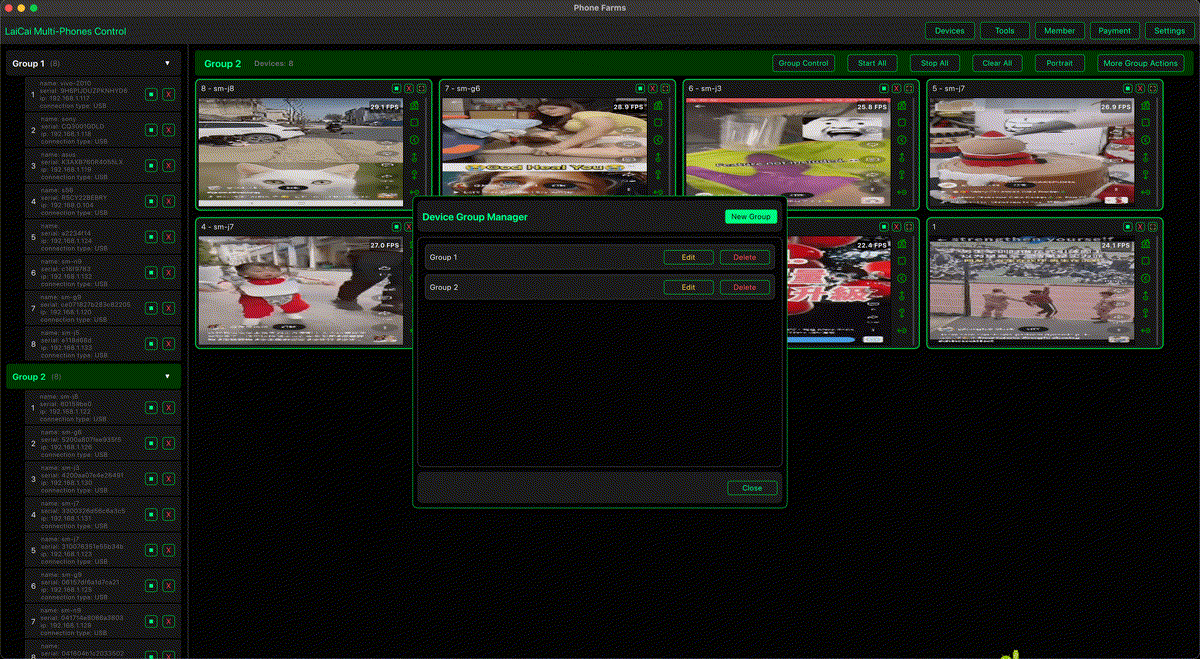
Live commerce is operationally busy. A team may need to watch the stream preview, check product pages, follow chat, confirm coupon visibility, monitor order signals, record problems, and review the live session afterward. Doing all of that on one phone is slow and easy to miss.
Platforms such as TikTok Shop and YouTube Shopping support product discovery and shopping inside video or live experiences. That makes the mobile workflow important: the seller team has to see what shoppers see, not only what the host sees. LaiCai Screen Mirroring helps live commerce teams turn several Android phones into one visible PC or Mac workspace.
Why Live Commerce Teams Use Multiple Phones
Different phones can take different roles during a live sale. One phone can show the public stream, another can show the product page, another can watch chat, and another can keep a backup account or order-related page ready. This reduces switching and helps the operator notice problems faster.
- Preview phone: watch the stream like a real viewer.
- Product phone: check product cards, images, prices, stock, and links.
- Chat phone: monitor questions, pinned comments, and common objections.
- Order or coupon phone: verify promotion visibility and order flow where allowed.
- Backup phone: keep a secondary device ready for account, network, or app issues.
How LaiCai Fits the Live Selling Desk
With LaiCai, these Android phones can stay visible on one computer. The operator can group devices by role, use mouse and keyboard control, capture screenshots, record short clips, transfer files, and keep the whole live selling desk easier to supervise.
This is especially useful for teams that already use several phones for social apps, shop apps, customer chat, product checks, and live preview. For a broader multi-device setup, read how to control multiple Android phones from one computer. For seller workflows, see how e-commerce sellers can manage multiple Android phones.
Before Going Live
- Assign each phone a role: preview, products, chat, coupons, backup, or recording.
- Connect key phones by USB for better stability.
- Open LaiCai and arrange the screens in the same order every session.
- Check product cards, prices, coupon pages, pinned links, and landing pages.
- Record a short test clip to review audio, lighting, framing, and readable text.
- Disable private notifications that should not appear during operations.
During the Live Session
- Keep the viewer preview visible so the team can catch lag, poor framing, or unreadable product details.
- Use the product phone to confirm that the promoted item matches what the host is talking about.
- Use the chat phone to collect repeated questions for the host or customer service person.
- Use screenshots when a product card, coupon, price, or page looks wrong.
- Use short recordings for timing issues, app freezes, network problems, or customer-flow problems.
After the Live Session
The same phone workspace can support review. Teams can collect screenshots, export recordings, compare product flow problems, and prepare a checklist for the next session. The goal is to improve real operations: clearer product presentation, faster replies, fewer missed questions, and better post-live learning.
Use the Workflow Responsibly
Multiple phones should support legitimate operations, not fake engagement. Do not use devices for fake viewers, fake likes, fake comments, fake orders, spam, account abuse, or platform-rule evasion. Live commerce grows best when the team improves the actual customer experience.
Conclusion
A good live commerce setup is not only about the host and the camera. The operations desk matters. LaiCai helps teams keep multiple Android phones visible and controllable from one computer, so product checks, chat monitoring, order flow review, screenshots, recordings, and post-live improvement become easier to manage.