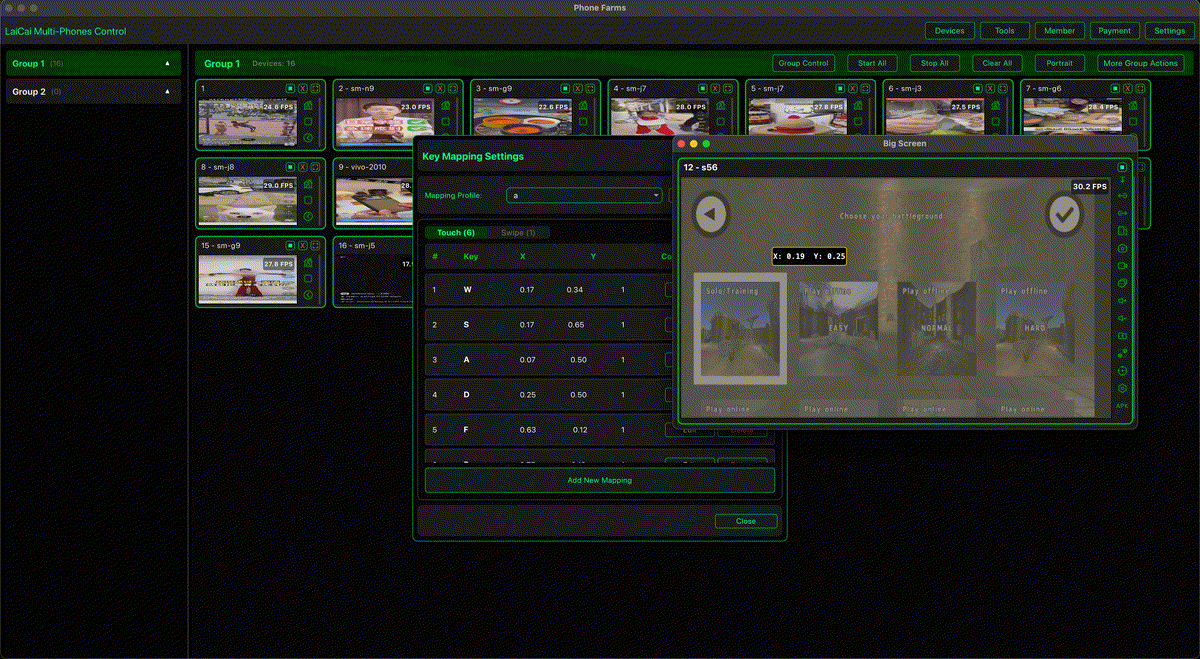
The best Android screen mirroring software for mobile gamers is not just the tool with the biggest window. Gamers need smooth motion, low input delay, stable USB or Wi-Fi connections, keyboard and mouse control, customizable key mapping, and a workflow that does not break in the middle of a match.
LaiCai Screen Mirroring is built for players who want to keep games running on a real Android phone while controlling them from a PC or Mac. It is useful for shooters, MOBAs, RPGs, sandbox games, creators recording clips, and users who manage more than one gaming phone.
What Mobile Gamers Should Look For
- Low latency, especially for shooters and action games.
- Stable USB connection for long sessions.
- Keyboard and mouse control with custom layouts.
- Mouse-look support for aim and camera control.
- Drag-and-drop key mapping for touch buttons, joysticks, skills, and gestures.
- Screen recording and screenshots for clips or tutorials.
- Support for PC and Mac when teams or creators use different computers.
- Multi-device visibility for testing, accounts, creators, or game studios.
Why Real-Phone Mirroring Matters
Emulators can be useful, but some players prefer real phones because the game runs in the actual Android environment. A real device keeps the real login state, device performance, graphics behavior, touch layout, notifications, and compatibility. If you want to avoid emulator limitations, read how to play Android games on PC without an emulator.
Where LaiCai Stands Out
LaiCai focuses on the complete gameplay workspace. You can mirror the Android screen, use keyboard and mouse controls, create fully customizable key mapping, record gameplay, take screenshots, transfer files, and manage multiple devices. This makes it more than a simple mirror; it becomes a control center for mobile gaming on a computer.
For specific layouts, read the best keyboard mapping setup for Android games on PC. If you are comparing tools, see the scrcpy alternative guide for gamers and multi-device users.
Recommended Game Types
LaiCai is especially useful for PUBG Mobile, Free Fire, Call of Duty Mobile, Arena Breakout, Blood Strike, Standoff 2, Mobile Legends: Bang Bang, Honor of Kings, Brawl Stars, Genshin Impact, Honkai: Star Rail, Roblox, Minecraft, and other Android games where a larger screen and better controls improve comfort.
Recording and Content Creation
Mobile gamers who create content should also think about recording. A good mirroring workflow lets you test a short clip, check audio, record clean gameplay, and move files to the computer for editing. For a full recording workflow, read how to record Android gameplay on PC with keyboard and mouse controls.
Responsible Use
Use screen mirroring and key mapping responsibly. Follow each game's rules and avoid cheats, unfair automation, recoil scripts, account abuse, or any behavior that violates game terms. The goal is better control, visibility, and content creation, not unfair play.
Conclusion
If you only need a minimal technical mirror, tools like scrcpy are excellent. If you want a gaming-focused workspace with visual key mapping, mouse control, recording, screenshots, file transfer, and multi-device management, LaiCai is one of the strongest Android screen mirroring choices for mobile gamers.