A practical guide for mobile game farming teams choosing between group control, key mapping, macros, and LaiCai Flow while staying within each game's rules.
Start with the business model and the game rules
A mobile game farming studio earns money by performing game work at scale: collecting resources, providing permitted leveling or play services, producing tradable items where the publisher allows it, or operating accounts for clients under an approved arrangement. The hard part is not buying more phones. It is finding a legal, repeatable task whose revenue still exceeds devices, electricity, connectivity, labor, failed runs, account losses, and transaction fees.
Check the current rules before choosing any tool. Some games allow several accounts or built-in auto-play but prohibit third-party macros. Others prohibit account sharing, real-money trading, synchronized inputs, or any automation. Supercell lists bots and gameplay automation scripts as prohibited third-party software. Riot also prohibits unauthorized scripts, bots, trainers, and automation programs. EA's FC Mobile rules prohibit external tools and bots. A workflow that is acceptable in one title can close accounts in another.
- Confirm whether multiple accounts, account sharing, real-money trading, key remapping, macros, and unattended play are allowed.
- Use the game's own marketplace or an authorized trading channel when one exists.
- Do not build a plan around anti-detection, device fingerprint spoofing, CAPTCHA bypass, or hiding prohibited automation.
- Write the allowed and prohibited actions on one run card so every operator follows the same boundary.
This guide explains workflow design, not a promise of income. Profit comes from project selection, market demand, game rules, operator judgment, and cost control. Software only changes how efficiently an allowed task is performed.
Prove one small workflow before scaling the phone count
Begin with two or three Android phones and one narrowly defined task. For example, you might open a game, collect a publisher-provided daily reward, start an in-game auto-battle mode, check inventory, and stop when a known screen appears. Use only a sequence the game permits. The goal of the first week is to learn where time and failures occur, not to maximize device count.
- Write the exact start state, allowed actions, finish state, and reasons for stopping.
- Run the task manually on one phone and record the active minutes, waiting minutes, and common interruptions.
- Repeat it on three phones and note which steps are truly identical and which require judgment.
- Separate revenue from gross output, then subtract labor, device cost, power, network, fees, and expected failed runs.
- Scale only after the task remains understandable and profitable under conservative assumptions.
A small test also tells you which control layer is useful. If operators mainly lose time switching windows, start with mobile phone group control. If the task is still active manual play, key mapping may matter more. If a short sequence never changes, a macro may be enough. If the next action depends on the screen, use a state-aware Flow instead of making the macro longer.
Use group control for visibility and shared manual actions
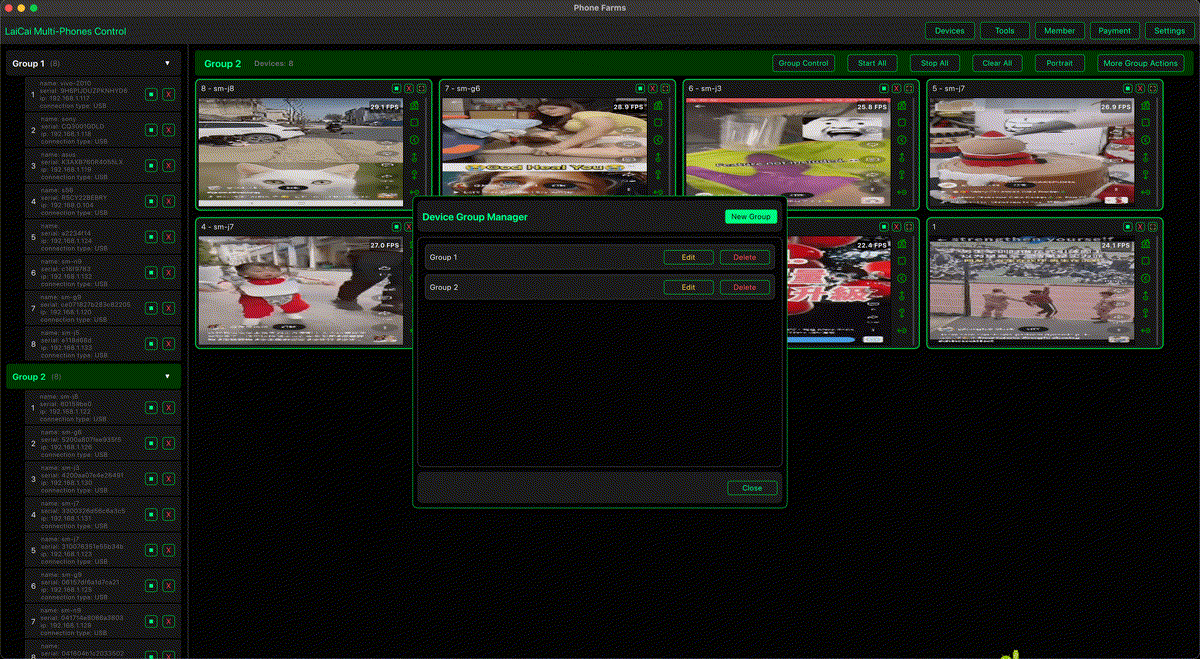
Group control is the foundation of a real-phone game desk. It puts several Android screens in one computer workspace, lets an operator organize devices by project or stage, and can forward the same permitted touch, gesture, or mapped input to a selected group. Its main value is reducing window switching while keeping every phone visible.
| Good fit | Poor fit | What to verify |
|---|---|---|
| Open the same menu, start a built-in game feature, collect a permitted reward, or move several devices to a shared checkpoint | Devices are on different screens or need different choices | Every selected device reaches the expected screen |
| Watch account or device status from one desk | Unattended decisions that depend on changing game state | No phone is hidden behind another window |
| Pause one group and continue another | Competitive actions where synchronized input is prohibited | The game's rules allow the action and input method |
Do not assume one broadcast action succeeded everywhere. A slow connection, update prompt, reward popup, or different screen size can leave one phone behind. After each shared stage, stop and check the screens. Group control is strongest when it helps a human see and direct a batch, not when it hides individual device state.
Use key mapping to make manual play faster and easier
Keyboard, mouse, and gamepad mapping is for work that still needs a person. It turns frequently used screen regions and gestures into familiar controls, which can reduce hand travel and make long sessions easier to operate from a desktop. This is useful for camera movement, menu navigation, movement sticks, skill buttons, or repeated manual confirmations.
- Create one mapping profile per game and screen layout instead of forcing one universal layout.
- Keep purchase, trade, deletion, and account-security actions outside one-key sequences.
- Test mappings after game updates because buttons and safe areas may move.
- Use key mapping only where the game permits remapped or external input.
Key mapping does not make the task unattended. That is a benefit when human judgment matters. The operator can see the live phone screen, react to unusual states, and stop before a wrong trade or irreversible action.
Use macros only for fixed, predictable sequences
A macro records a known sequence of touch, keyboard, mouse, or gamepad actions and replays it. It works well when the start screen, button positions, delays, and finish state are stable. Examples can include opening a permitted daily menu, confirming a fixed set of screens, or replaying a short operator-approved setup sequence.
A macro cannot understand why the screen changed. If a loading time is longer, a popup appears, a device reconnects, or one account starts on a different page, the same recorded tap may hit the wrong control. The safe pattern is short macro, visible result, and a clear stop. Avoid one giant recording that tries to cover an entire shift.
- Record the smallest useful sequence.
- Name it after the task and expected finish state.
- Run it once on one phone while watching the result.
- Assign it to a small device group only after the one-phone test passes.
- Stop and review any device that does not reach the expected screen.
LaiCai lets each phone or group keep its own macro assignment. That helps a studio separate projects and stages, but it does not remove the need to check game policy or monitor the outcome.
Use LaiCai Flow when the next action depends on the screen
LaiCai Flow is the automation feature inside LaiCai Screen Mirroring. It is useful when a workflow must observe the current screen before deciding what to do. Instead of assuming that a button appears after a fixed delay, a Flow can check a UI element, image, object, or text, then tap, wait, run a macro, repeat a bounded subflow, or stop for human review.
| Situation | Better tool | Reason |
|---|---|---|
| Same input should be sent to several visible phones | Group control | A person remains in charge of a shared step |
| A person plays or navigates faster from a keyboard or controller | Key mapping | The action still depends on human judgment |
| A short sequence always starts and ends on known screens | Macro | Recorded replay is simpler than a full workflow |
| A popup, loading state, reward screen, or missing button changes the next step | LaiCai Flow | The workflow can observe state before acting |
The practical design is not to replace every human action. Let the Flow handle an allowed, repetitive check, then stop at account security, purchases, trades, unexpected screens, or any action the operator has not approved. The LaiCai Flow guide explains how editable Flow profiles are built and run.
Combine the four tools into one controlled work shift
A useful studio workflow gives each tool one job. Group control organizes the desk. Key mapping improves active manual work. Macros replay short stable sequences. LaiCai Flow handles permitted state-based checks. The operator owns the exceptions and all high-risk actions.
- Start the shift by checking device connection, battery or power, temperature, network, game version, and account status.
- Place phones into groups by game, project, or current stage.
- Use group control for a shared, visible setup step only when every device starts from the same state.
- Use key mapping for active play that needs a person's decisions.
- Use a short macro for one stable repeated sequence.
- Use LaiCai Flow for a permitted screen-dependent check, with bounded retries and a clear failure path.
- Stop for human review before purchases, trades, account changes, captchas, or unexpected screens.
- End the shift with an exception list rather than pretending every device completed successfully.
A simple observable test is enough for the first version: connect three phones, place them on the same approved start screen, perform one shared action, run one short macro, and verify that a Flow stops when the expected button is absent. If an operator can immediately identify the failed phone and take control, the workflow is becoming manageable.
Track net output, exceptions, and operator time
Device count is a poor success metric. A studio can add phones and still lose money if failed runs, repairs, heat, bans, fees, or manual cleanup grow faster than output. Track what determines net value.
- Completed permitted tasks per shift, separated from attempted tasks.
- Active operator minutes and exception-handling minutes.
- Devices that overheated, disconnected, updated, or showed an unexpected screen.
- Revenue actually settled through an allowed channel, minus every operating cost.
- Rule changes, warning messages, suspensions, or market changes that invalidate the project.
Review the numbers weekly. Stop scaling if the workflow needs constant rescue, the game's economy no longer supports the work, or the rules no longer permit the method. A smaller visible operation is better than a large fragile one.
Common questions from mobile game farming studios
Can group control make every phone perform the same task automatically?
Group control can forward a shared input to selected devices, but it cannot guarantee that every phone is on the same screen or that the game allows synchronized operation. Keep all screens visible and verify the result after each shared stage.
Should a studio use real phones, emulators, or cloud phones?
Choose according to the game rules, device compatibility, cost, heat, network dependence, control latency, and the need to see real-device behavior. LaiCai focuses on controlling real Android phones and supported Android environments from a computer; it does not make one infrastructure choice correct for every project.
Is a macro the same as LaiCai Flow?
No. A macro replays a recorded sequence. LaiCai Flow can combine observations, conditions, waits, bounded repetition, input actions, and existing macros. Use the simpler macro when the screen is predictable; use a Flow when state changes matter.
Will automation guarantee that a game farming studio earns money?
No. Automation can reduce some repetitive labor, but it cannot guarantee demand, price, account safety, game longevity, transaction settlement, or profitability. Test a small batch and calculate net results before purchasing more devices.
Build a visible, rule-aware Android game workspace
For a mobile game farming studio, the useful question is not how to automate everything. It is which permitted step should stay manual, which step can be shared across visible devices, which short sequence is stable enough for a macro, and which screen-dependent check needs a Flow. Start with three phones, one task, one expected finish state, and one person who can take control. When that small workflow remains visible, compliant, and profitable, the multi-device Android control workspace is ready to grow carefully.